Sep 17, 2026
Consent Mode v2: How to Set It Up and When Google Actually Recovers Lost Conversions

If your site has a cookie banner and your advertising or analytics reach users in Europe, a simple question follows: do Google's tags know what the person chose in that banner. If they do not, there are two options, and both are bad. Either the tags fire without consent and you break the rules, or they are blocked entirely and you lose the conversion data automated bidding learns from.
Consent Mode v2 is the mechanism that resolves this. Below is what it does, how basic and advanced modes differ, when Google actually recovers lost conversions, how to set it up in Google Tag Manager, and where it most often breaks.
0
core consent signals for Google
0
modes: basic and advanced
0
ad clicks in 7 days before Google models conversions
0
the year v2 became required for EEA traffic
Consent Mode passes the user's cookie banner choice to Google's tags, and the tags change their behaviour accordingly. Version 2 added two signals to the cookie ones: consent to send user data to Google, and consent to ad personalisation. For traffic from the European Economic Area they have been required since March 2024; without them audiences, remarketing and part of measurement stop working. In basic mode tags do not load at all before consent. In advanced mode they send cookieless pings, and Google models conversions for people who declined. But modelling only switches on above a threshold: in Google Ads that is 700 ad clicks over 7 days per country and domain pairing. For a small site, Consent Mode is first and foremost about compliance, not data recovery.
What Consent Mode is, and what changed in version 2
Consent Mode does not display a banner or collect consent itself. That comes from your consent management platform, meaning the cookie banner. Consent Mode is the bridge between the banner and Google's tags: it tells the tags the consent status, and the tags decide whether to write cookies and what data to send.
| Signal | What it controls | Introduced |
|---|---|---|
ad_storage | Cookies and identifiers for advertising | v1 |
analytics_storage | Cookies for analytics, including GA4 | v1 |
ad_user_data | Consent to send user data to Google for advertising | v2 |
ad_personalization | Consent to personalised ads and remarketing | v2 |
Further types exist for non-Google tags: functionality, personalisation and security cookies. For Google advertising and analytics, however, these four are the ones that matter.
Who needs Consent Mode
- Required for anyone serving Google ads to users in the EEA or using Google measurement on that traffic. Without v2 signals, audiences, remarketing and some measurement features stop working for those users.
- Businesses outside Europe selling into it, for the same reason: requirements follow where the user is, not where the company is registered.
- Sites with no European traffic: Google does not require it, but if the site already has a cookie banner, Consent Mode is the only correct way for tags to respond to it rather than firing around it.
Basic and advanced mode
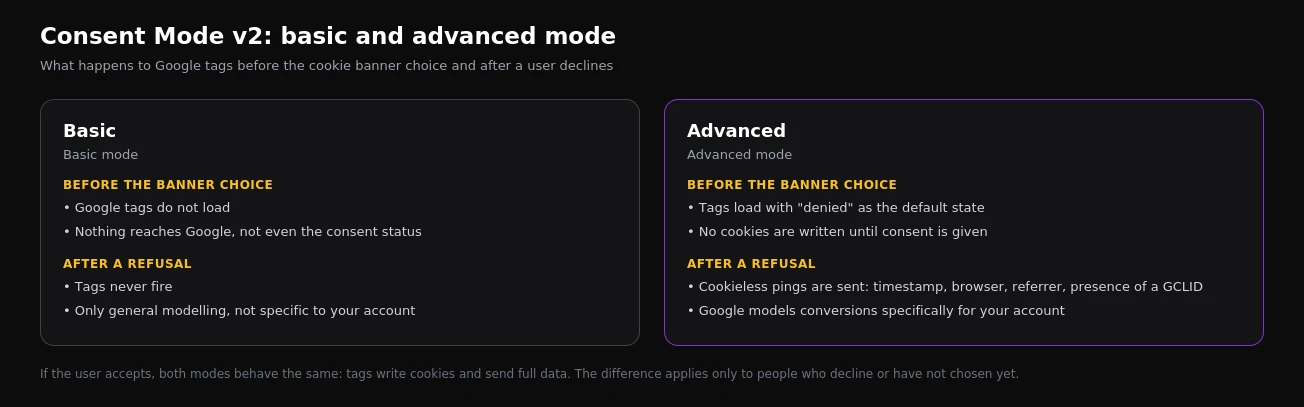
In basic mode, Google tags are blocked until a choice is made in the banner. If the person declines, nothing reaches Google, not even the fact of the refusal. Conversion modelling in this mode can only be general, not specific to your account.
In advanced mode, tags load immediately, but with "denied" as the default state and without cookies. Until consent is given they send cookieless pings: timestamp, browser type, referrer, whether a click identifier is present, and the consent state. Google builds the conversion model for your account from exactly these pings.
Advanced mode yields more data, but some EU lawyers and regulators consider even cookieless pings to be data processing that requires consent. The choice of mode is a legal decision as much as a marketing one. If your company takes a conservative legal position, choose basic and do not count on modelled conversions.
When Google actually recovers lost conversions
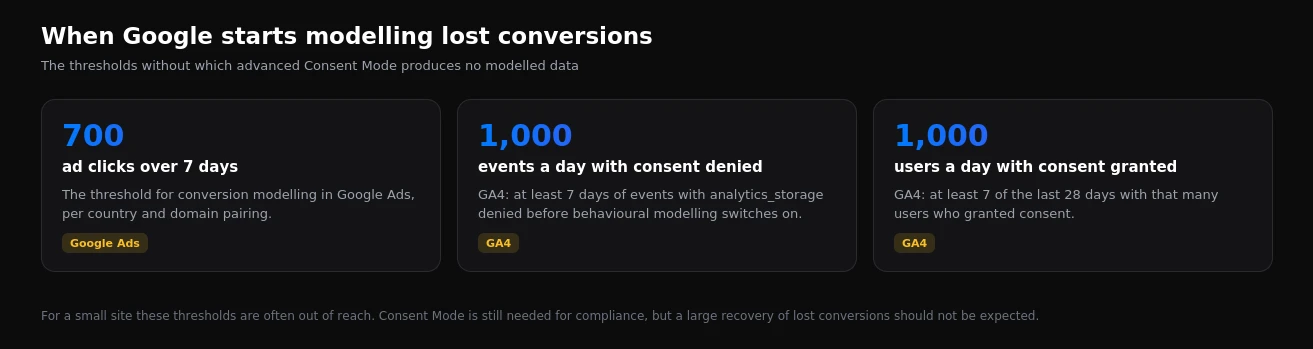
The most common expectation of Consent Mode is that "Google will fill in everything we lost to the banner". That is only true with enough data.
In Google Ads, conversion modelling switches on once a country and domain pairing reaches 700 ad clicks over 7 days. In GA4, behavioural modelling needs at least a thousand events a day from users without consent for 7 days, and a thousand users a day with consent on at least 7 of the last 28 days.
For a high-traffic online store that is realistic, and modelled conversions noticeably reduce the loss. For a local business with a few hundred clicks a week the thresholds will not be reached, and advanced mode will produce pings without any meaningful recovery in reports.
How to set up Consent Mode in Google Tag Manager
- Choose a consent management platform. Google recommends certified partners: their Consent Mode integration is built in, and the banner sends the signals itself.
- Set the default state before any tags. GTM has a consent initialisation trigger that fires before everything else. For the EEA the default is "denied".
- Update the state after a choice. When someone clicks "Accept" or changes their settings, the banner sends an update and tags receive the new status without a page reload.
- Check consent settings for every tag. Google tags have built-in consent checks. Third-party tags, such as the Meta pixel, need the required consent specified manually so they do not fire without it.
- Test. GTM preview mode and Tag Assistant both have a dedicated consent tab showing the default state, the update and each tag's behaviour.
In simplified form, the default state looks like this:
gtag('consent', 'default', {
  ad_storage: 'denied',
  analytics_storage: 'denied',
  ad_user_data: 'denied',
  ad_personalization: 'denied',
  wait_for_update: 500,
  region: [ /* countries this state applies to */ ]
});
In practice, the details around this snippet matter: separate states for different regions, the load order of banner and tags, and parameters such as url_passthrough, which helps preserve the click identifier in links without cookies, and ads_data_redaction, which further limits ad ping data when consent is denied.
What changes in your reports after launch
In the first days after a correct setup, numbers almost always drop, and that is normal. Previously tags fired for everyone; now they fire only for people who agreed. GA4 will show fewer observed users and sessions, and in Google Ads some conversions will stop being recorded directly.
If the thresholds are met, modelled data appears within a few weeks: in GA4 through the blended reporting identity, and in Google Ads directly in the "Conversions" column. Comparing "before" and "after" without accounting for this step change is misleading: the drop is caused by more honest measurement, not by the advertising.
Common mistakes
| Mistake | Consequence |
|---|---|
| The banner loads after the tags | Tags fire before consent is known |
| The EEA default is set to "granted" | A compliance breach; data is collected before any choice |
| The "Accept" button sends no update | Tags stay blocked even after consent |
No ad_user_data or ad_personalization signals | Audiences and remarketing stop working for the EEA |
| Meta pixel without a consent check | Third-party tags fire around the banner |
| Testing in your own browser with consent already given | Problems stay hidden because "granted" is stored |
How to check that everything works
- Open the site in an incognito window without touching the banner, and check the default state in Tag Assistant's consent tab.
- Click "Reject" and confirm that no advertising or analytics cookies appear and the state changes to "denied".
- Repeat with "Accept" and confirm all four signals switch to "granted".
- In Google Ads, open conversion action diagnostics to see whether the account receives Consent Mode signals.
- After two or three weeks, compare conversions against CRM data to estimate how much is being lost and whether modelling has appeared.
Frequently asked questions
Does Consent Mode replace a cookie banner?
No. The banner collects consent; Consent Mode only passes it to Google's tags. Without a banner, Consent Mode has nowhere to get the user's choice from, and a banner without Consent Mode does not affect how Google tags behave.
Does Consent Mode affect Meta or TikTok ads?
Not directly; it is a Google mechanism. Consent for third-party pixels has to be handled separately, through GTM consent settings or the banner's own integration. Otherwise Google tags behave correctly while the Meta pixel fires without consent.
Do we need Consent Mode if we use server-side GTM?
Yes. A server container changes how data travels, but it does not remove consent requirements. The consent state must pass from the browser to the server container and on to Google; otherwise server-side tagging simply moves the breach from the browser to the server.
Consent Mode is one part of a wider measurement setup. We covered other ways to recover lost conversions in our guides to Enhanced Conversions and server-side tagging, and how to hunt down container errors in our GTM preview mode guide. If you want Consent Mode, the banner and conversions set up together and tested on real events, see what our conversion tracking setup includes.
Want results like this for your brand?
Get a free strategy call and a tailored proposal within one business day.
Get a Free Proposal