Sep 8, 2026
How to Launch Google Ads From Scratch in 2026: Full Step-by-Step Guide

Most guides to launching Google Ads open with how to click the "New campaign" button. That is precisely why most first launches end in a burnt budget. The account is the last step, not the first. What follows is the full order of operations: what to do before advertising, how to build the campaign, how much to budget, and what to do in the first two weeks when it feels like nothing is working.
0-14 days
proper preparation before a first launch
$0,000
realistic monthly minimum to see a signal
0-50
conversions the algorithm needs before it performs
0-8 weeks
until cost per lead becomes stable
To launch Google Ads from scratch you need to: work out what you can afford to pay per customer; prepare the page you will send people to; set up analytics and conversion tracking; build a keyword list and negatives; create a search campaign with a clear structure; launch on manual or semi-automated bidding; and review search terms daily for the first week. First leads arrive within 1-3 days; stability takes 4-8 weeks.
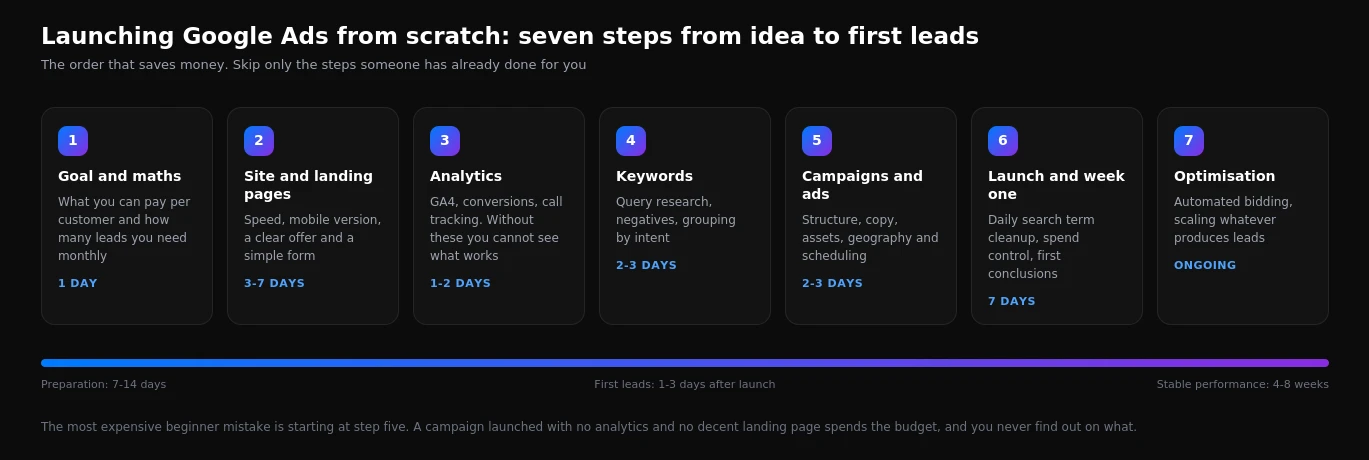
Step 1. Do the maths before spending anything
This is the most important step and the one skipped most often. Without these numbers you cannot tell whether the advertising is working, because there is nothing to compare against.
You need three figures. The average order value. The margin on that order, meaning what actually remains. And the close rate from enquiry to payment: out of a hundred enquiries, how many become customers.
Take the margin on one customer and multiply it by your close rate. If you earn $150 per customer and close one enquiry in three, a lead cannot cost more than $50 - and that is break-even, with no profit. A comfortable target is usually half that, so around $25.
Then work backwards. If you need 20 customers a month and close a third of enquiries, you need 60 leads. If the site converts 3% of visitors, that is 2,000 clicks. At $2.50 per click the budget comes to $5,000. If that money does not exist, there are two options: narrow the geography and the keyword set to work at smaller volume, or accept that the channel is out of reach for now.
Step 2. Prepare the page you will send traffic to
Ads do not sell. The page sells. If it is weak you will pay for clicks and get nothing, and Google will also raise your cost per click because of the poor experience.
The minimum requirements for a landing page look like this:
- Loads in under three seconds on mobile. Half of visitors abandon a slower page. PageSpeed Insights checks this for free.
- Says the same thing as the ad. If the ad promised fridge repair, the visitor must see fridge repair, not a general services page.
- Prices, or at least a range. Pages with no pricing signal convert two to three times worse.
- A short form. Name and phone. Every extra field costs you a share of the enquiries.
- A visible phone number and messaging options. A large share of people will message rather than fill in a form.
- Proof you can be trusted. Reviews, photos of your work, guarantees, certifications. This person is seeing you for the first time.
Step 3. Set up analytics before launch, not after
A campaign without conversion tracking is spending money blind. You will see clicks and impressions but never learn which queries produce enquiries. Automated bidding also cannot function without that data: there is nothing for the algorithm to aim at.
| What to set up | Why | Difficulty |
|---|---|---|
| GA4 on the site | see behaviour, not just clicks | easy |
| Form submission conversion | the baseline metric; nothing works without it | easy |
| Phone and messenger clicks | most enquiries often arrive this way | moderate |
| CRM conversion import | optimise towards sales rather than raw leads | advanced |
| Google Tag Manager | avoid editing site code for every change | moderate |
The minimum to start is GA4 plus form and phone-click conversions. CRM import can wait until leads are flowing, but it is what delivers the biggest quality gain over time.
Step 4. Build your keyword list and negatives
This is where you decide what you will be paying for. Queries split by intent, and not all of them are equally useful at launch.
Start here
Queries containing "buy", "order", "price", "cost", "near me", "emergency", plus specific service names combined with a city. This person is ready to act now.
There are not many of them and they carry the highest cost per click, but they produce enquiries from day one. At launch the entire budget belongs here.
Add in the second phase
Comparison and evaluation: "best", "vs", "which to choose", "reviews of". The person is still deciding but already engaged with the category.
Lower conversion, cheaper clicks. Worth adding once the high-intent terms work and you know your real cost per lead.
Leave these alone at launch
Informational queries: "how to", "what is", "DIY". This person wants information, not a provider, and frequently has no intention of paying anyone.
That is SEO territory. In paid search these queries almost always consume budget without producing enquiries.
Negatives matter as much as the keywords themselves. A baseline list for most businesses: free, DIY, jobs, careers, salary, used, second hand, images, template, download, forum, wikipedia, plus competitor names if you are not running a dedicated campaign for them, and the names of cities you do not serve.
Broad match with no negatives. You add "apartment renovation" and Google shows you for "apartment renovation DIY", "washing machine repair" and "apartment renovation photos". Half the budget goes to people who will never buy anything. For the first week, open the search terms report every single day.
Step 5. Build the campaign with a sane structure
Structure determines how precisely you can steer money. The logic is simple: one ad group, one theme of queries, one landing page.
| Level | What belongs here | Typical mistake |
|---|---|---|
| Campaign | budget, geography, language, bidding, scheduling | every service in one campaign on one budget |
| Ad group | one narrow theme, 5-15 closely related queries | a hundred unrelated keywords in one group |
| Ads | headlines matched to that group's queries | identical copy across every group |
| Assets | sitelinks, callouts, prices, phone number | left empty entirely |
For a first launch, one search campaign with three to five ad groups is enough. Turn off the Display Network expansion with its separate checkbox: Google enables it by default and it will spend your budget on incidental placements across sites and apps.
What to write in the ads
- First headline: the query itself, word for word. If they searched "emergency plumber Manchester", that is what the first headline should say.
- Second: your advantage. On site within an hour, two-year guarantee, from $80. Something specific, not "high quality".
- Third: a call to action or an objection removed. Free diagnostics, pay after the work, open seven days.
- At least three distinct ads per group. Google will work out which performs better.
- Every asset filled in. They are free, they make the ad physically larger and they noticeably lift click-through rate.
Step 6. Launch and the first week
The first week is the most expensive and the most useful. The system knows nothing about you yet, so it spends money testing hypotheses, and your job is to cut off what does not work fast.
- Start on manual bidding or with a cost-per-click cap. Automated strategies need conversion data and you have none yet. Give the system two to three weeks to accumulate it.
- Set a daily budget you can afford to lose. Smaller with daily oversight beats larger without it.
- Open the search terms report every day. This is the single most important tool of the first fortnight. Everything irrelevant goes straight into negatives.
- Verify conversions actually fire. Submit a test enquiry yourself and confirm it appears in the statistics.
- Draw no conclusions before a full week. Early data swings wildly, and any decision based on three clicks will be wrong.
Do not change bids daily, do not switch off ad groups after two days without leads, and do not rewrite the ads every evening. Every change restarts the learning process. The rule is simple: one change at a time, and at least three or four days to judge it.
Step 7. Optimising after the first month
Once data has accumulated the real work begins. Here is the order of operations that produces the most impact.
Ad copy usually produces the smallest gain despite absorbing the most attention. If leads are scarce, look first at which words you are appearing for and where those people land.
What to budget
Realistic figures covering both media spend and management.
Testing the niche
$800-1,200
One city, high-intent queries, one campaign. The goal is to learn your real cost per lead, not to profit.
A working launch
$2,000-4,000
Several service lines, remarketing, proper analytics and ongoing management. The most common scenario.
Scaling up
$6,000+
National coverage, shopping campaigns, multiple campaign types and a dedicated specialist on the account.
Note the structure: roughly 65-75% goes directly to clicks and the rest to management. If someone offers to run campaigns for a token fee, it usually means the account will be opened and then forgotten.
What clicks cost across categories
Approximate ranges for 2026. These are averages: major metros run higher, smaller markets 20-40% lower. European markets in euros sit broadly in the same bands.
| Category | Cost per click | Realistic cost per lead |
|---|---|---|
| Appliance repair | $2-5 | $25-60 |
| Dentistry | $6-14 | $90-220 |
| Legal services | $15-60 | $180-600 |
| Construction and renovation | €5-18 | €110-400 |
| E-commerce products | $0.60-3 | $15-70 |
| Courses and education | $4-11 | $60-180 |
Which campaign types exist and where to start
Google offers at least seven options in the interface, and an inexperienced user usually picks whichever the system recommends. That is almost never the right choice for a first launch.
| Campaign type | Where it appears | When it fits |
|---|---|---|
| Search | in Google search results | always first for a beginner: the person is actively searching |
| Display | on partner sites and in apps | for remarketing, not for first acquisition |
| Shopping | in product results with image and price | for online stores with a working product feed |
| Performance Max | everywhere at once, automatically | once conversion data exists, not at launch |
| Video | on YouTube | for awareness, when you have decent footage |
The right sequence for most businesses is this: a search campaign on high-intent queries first, remarketing to past visitors after a month or two, and only then, once a few dozen conversions have accumulated, an experiment with Performance Max. Launching Performance Max as a first campaign is advice Google itself gives regularly, and it is also the fastest way to spend a budget without understanding where it went, because that campaign type exposes no detailed query data.
What to prepare before you even open the account
Small practical matters that otherwise cost days. Deal with them in advance.
- A payment method. A company card or billing account. Personal cards are sometimes declined, and the campaign stops at the worst possible moment.
- Access to the website. You will need to install tracking code. If the developer replies once a week, that delays the launch.
- A phone number someone actually answers. A call from an ad that nobody picks up is money spent for nothing.
- Agreement on who handles enquiries. Ads produce leads within an hour of launch. If nobody responds until evening, half of them go to a competitor.
- Pricing, or at least indicative figures. You will need them for both the landing page and the ad assets.
Research consistently shows the odds of closing a lead fall sharply if you reply later than five minutes. This applies to any advertising: the person has clicked three competitor ads as well, and whoever calls back first wins. Fixing lead response time often lifts sales more than any campaign optimisation.
A full worked example
Take a laptop repair shop in a city of 300,000 people and run every step with numbers attached.
Step 1, the maths. Average ticket $70, margin about $35. Two enquiries in three convert, because the demand is urgent. So the allowable cost per lead is up to $23, with $10-12 comfortable.
Step 2, the budget. A click in this category costs $1.20-2.20; call it $1.60. A decent page converts high-intent search traffic at around 6%, putting a lead at roughly $27. Slightly above target, which is normal before optimisation.
Step 3, the volume. To get 40 leads monthly you need about 670 clicks, or roughly $1,070 in media. Add management and the total lands near $1,600.
Step 4, the structure. Three ad groups: general laptop repair, screen replacement, cleaning and thermal paste. Each points to its own page with its own pricing.
What happened in practice. In week one the cost per lead was $46, because part of the traffic came from DIY repair and spare parts queries. After 60 negatives were added and one irrelevant ad group was paused, it dropped to $29. By the end of month two, after switching to target cost per action bidding, it settled at $24.
This is normal and you should plan for it financially. The system is learning who to show you to, while you are learning which queries bring real customers. Assume the first month runs roughly 1.5x the eventual cost per lead. If the budget is built on needing profit in week one, advertising will almost certainly disappoint.
The most expensive mistakes
- Launching without conversion tracking. You will not know what works and cannot move to automated bidding. That is not saved time, it is guaranteed overspend.
- Display expansion left on in a search campaign. The checkbox is on by default and can drain up to half the budget on incidental placements.
- Geography set too wide. Advertising nationally when you serve one city is the fastest way to waste money.
- Sending traffic to the homepage. Someone searched for a specific service, landed on a general page and left to keep looking.
- A small budget spread across many themes. $150 across ten service lines produces data nowhere. Better one line and a real test.
- Constant changes in the first days. The campaign never accumulates statistics because you keep restarting the learning phase.
What to do in month two
Once the first campaign has stabilised and you know your cost per lead, the question becomes where to go next. Sequence matters here too.
- Turn on remarketing. People who visited without converting are the cheapest audience available. Reminding them costs a fraction of new acquisition.
- Add a branded campaign. Bidding on your own company name costs very little and protects you from competitors buying your brand and intercepting ready customers.
- Extend into mid-intent queries. Now that you know what cost per lead is acceptable, you can carefully add evaluation-stage terms.
- Check schedule and geography against the data. It often turns out that overnight leads cost three times more, or that one district produces half the enquiries. Both are reasons to reallocate.
- Consider a second channel. Once search hits its volume ceiling, the next step is social or shopping campaigns, depending on the business.
How not to lose the account at launch
Beginner guides rarely mention this, but suspensions in the first week happen more often than people expect and they stop everything.
- Enter billing details accurately. A mismatch between the legal entity on the account and the cardholder is a common trigger for review.
- Do not create a second account instead of fixing the first. If something is wrong, repair it. Duplicates get detected quickly and both accounts get suspended.
- Check the site against policy. You need a contact page, business details, refund terms and a privacy policy. Without them, ads are frequently disapproved.
- Do not promise what cannot be promised. Guaranteed outcomes in health or finance are direct policy violations.
How much time management takes
A realistic estimate for one straightforward campaign: 30-40 minutes daily in week one, then two to three hours a week. This is not advertising you can launch and revisit next quarter: without regular search term cleanup the cost per lead creeps upward even if everything worked well at the start.
Pre-launch checklist
Run through this list the day before going live. If a single item is unchecked, delay the launch.
- Allowable cost per lead and per customer calculated.
- The landing page loads fast and looks right on a phone.
- The page shows pricing or a range, a phone number, messaging options and a short form.
- GA4 installed, conversions configured and manually tested.
- Keywords collected and grouped by intent.
- A negative keyword list of at least 50 entries prepared.
- Display expansion switched off in the search campaign.
- Geography narrowed to the area you actually serve.
- Ad scheduling matched to your working hours if you cannot answer around the clock.
- Every available ad asset filled in.
- Daily budget and cost-per-click cap set.
- Someone assigned to check the search terms report daily for the first week.
Frequently asked questions
How much money do I need to start?
The minimum sensible budget for testing a niche is around $1,000 monthly in media, with tight geography and high-intent queries only. Smaller amounts produce too little data to conclude anything.
Can I run this myself without a specialist?
Yes, and in simple niches it is reasonable while validating the idea. Budget 15-20 hours for learning and the first build, and expect month one to cost more than later months. Leave the complex campaign types alone until you have experience.
How soon will the first leads arrive?
Usually within 1-3 days of launch. But the cost per lead in that first week is almost always higher than it will eventually be: the system is still learning and you are still filtering queries.
Do I need a separate site for advertising?
Not necessarily, if your site has proper service pages. A dedicated landing page is needed when no existing page matches the query precisely, or when the existing page is cluttered with everything else.
Which bidding strategy should I start with?
Begin with manual bidding or maximise clicks with a cost cap. Once 30-50 conversions have accumulated, move to target cost per action. Enabling automated bidding on day one with no data is asking the system to work blind.
What if I get clicks but no enquiries?
In 90% of cases the problem is the page or the queries rather than the ads. Check the search terms report first: you may be appearing for the wrong people. Then check the page: is it clear within the first screen what you offer and what it costs?
Can I bid on competitor brand names?
Technically yes, and it is common practice. But the clicks cost more, conversion is lower, and you cannot use someone else's trademark in the ad text. It is not where a launch budget belongs.
Can I advertise without a website, using only a social profile?
Not in Google Ads. Search campaigns require a destination page, and a social media profile does not qualify: those ads get disapproved. The minimum viable option is a simple one-page site with the service, pricing and a form.
How many keywords do I need at launch?
For a first campaign, 30-60 queries across three to five groups is plenty. A thousand keywords in a new account offers no advantage: the budget spreads thin and no group accumulates enough data. Fewer terms with more attention each works better.
What if competitors outbid me?
Do not try to beat everyone at any price. Position is not decided by money alone: ad relevance and landing page quality directly affect what you pay for the same position. It is often more profitable to move into narrower queries where competition is thinner and intent is sharper.
When can I judge the results?
First conclusions after two weeks, a full assessment after 4-8 weeks. Before that you are looking at the learning process rather than the campaign's performance.
Launching Google Ads from scratch is not about buttons in an interface, it is about preparation. Calculated economics, a decent page and working analytics decide more than any campaign setting. If you want a first launch built without the usual mistakes and with a forecast before you spend anything, talk to our team. If you would rather understand the numbers first, start here: what Google Ads costs and Google Ads vs Facebook Ads.
Want results like this for your brand?
Get a free strategy call and a tailored proposal within one business day.
Get a Free Proposal