Case Study - Account Audit
Auditing 8 Google Ads Accounts: 1,369 Dead Ads and Three Accounts Tracking Nothing
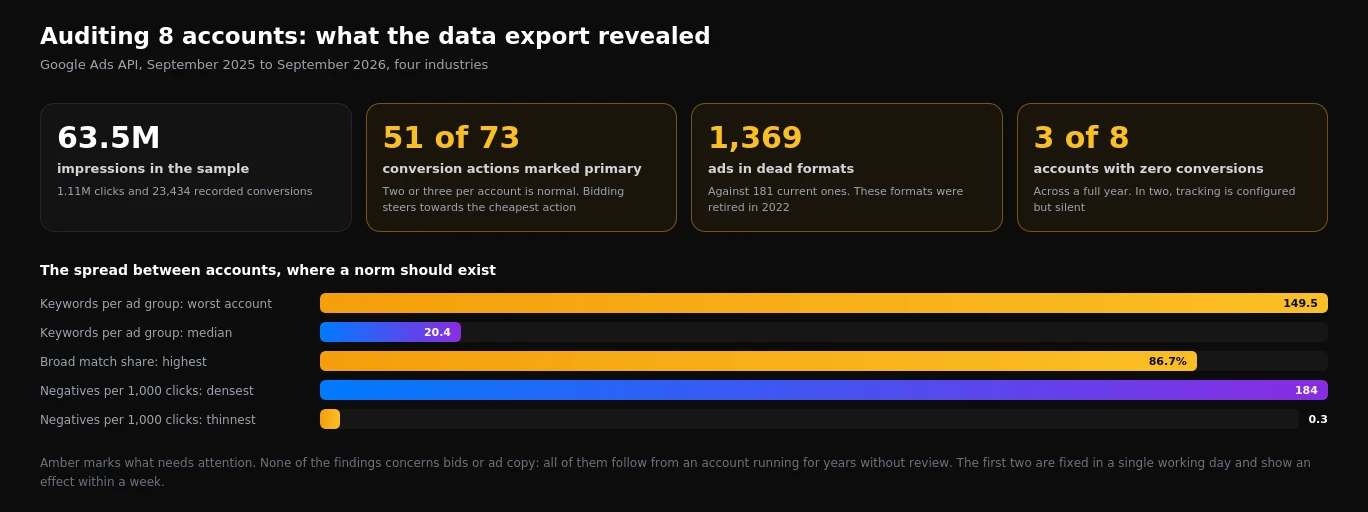
We pulled twelve months of data from eight live accounts through the API. No problem with bids or ad copy. What we found instead: 51 of 73 conversion actions marked primary, ad groups holding 149 keywords, and three accounts that recorded no conversions at all.
1,369
Dead Ads Found
51/73
Conversions Set as Primary
3 of 8
Accounts Tracking Nothing
Client
8 accounts, four industries
Industry
E-commerce, healthcare, industrial, B2B
Channel
Google Ads (account audit)
The challenge
People come to us with the same sentence, phrased slightly differently every time: "the advertising runs, the money goes out, and nobody can tell me what happens in between". The owner sees clicks and impressions in a report, sometimes conversions, but cannot explain why last month produced twice the enquiries for the same spend.
Advice from a distance is worthless in that situation. What is needed is access to the account and a few hours spent looking at how it is genuinely put together. We did exactly that for eight accounts at once and combined the results into a single picture.
What the accounts were
The sample was deliberately mixed, so we could see which problems repeat regardless of industry:
- E-commerce - three accounts running shopping campaigns and product feeds.
- Healthcare services - two accounts with local targeting, where phone calls are the main enquiry channel.
- Industrial products - two accounts with long sales cycles.
- B2B - one account with a narrow audience and high cost per click.
Across twelve months the totals came to 63.5 million impressions, 1.11 million clicks and 23,434 recorded conversions. The accounts varied in age from newly launched to more than four years old.
Why reading the interface does not work
The trouble with most self-checks is that people look wherever something glows red. Google Ads does not work that way: the most expensive problems are never highlighted at all. A campaign optimising towards the wrong goal looks perfectly healthy. An ad group holding a hundred and fifty keywords carries no warning. A conversion action that records nothing simply shows zero, which is easily mistaken for an absence of sales.
An account where everything is green and an account where everything is correct are two different accounts. The interface warns about disapproved ads and limited budgets, but says nothing about the fact that you are optimising towards taps on a phone number instead of paid orders. That is why an audit has to run on data rather than on visual impression.
What we set out to establish
Before starting, we wrote down five questions the audit had to answer concretely:
- Can the system see what actually counts as a result for this business?
- Does the account structure match the way people phrase their searches?
- How much residue is left from decisions taken years earlier?
- Is the budget protected from queries that never convert?
- Which of these should be fixed first?
The last question matters most. A list of thirty observations without priorities is useless: no business has the capacity to fix everything at once, and the impact of different corrections varies by an order of magnitude.
Our strategy
We run audits through the API rather than the interface. The reason is practical: the interface shows what Google considers important, while a data export shows everything, including the parts nobody thought to ask about. Here is how it went, step by step, and what turned up.
Step 1. Export rather than browse
For each account we pulled five slices of data covering twelve months:
- every enabled conversion action, with its type and primary status;
- every enabled campaign, with channel type, bidding strategy and network settings;
- negative keywords at campaign level;
- every enabled ad, with its format;
- ad groups and keywords with their match types.
That set gives a complete structural picture in ten minutes per account instead of two hours of clicking. The actual work begins afterwards, in the interpretation.
Step 2. What the conversions revealed
This turned out to be the most damaged area in the sample. Across eight accounts there were 73 enabled conversion actions, and 51 of them were marked as primary.
The primary flag determines where automated bidding steers a campaign. When ten goals carry that flag, the algorithm picks whichever occurs most often and costs least. In practice that is never the sale.
| What we found | Scale | Consequence for the business |
|---|---|---|
| Conversion actions in total | 73 across 8 accounts | An average of nine per account instead of two or three |
| Marked as primary | 51 (70%) | Bidding optimises towards ten goals at once |
| Auto-created app install actions | in 5 accounts | None of these businesses has an app |
| Leftovers from disabled Smart campaigns | in 4 accounts | Campaigns stopped long ago, goals still enabled |
| Accounts with no conversions in a year | 3 of 8 | Bidding runs blind, reporting shows clicks |
The starkest case: one account had clicks for driving directions and taps on the phone number in the business listing sitting among its primary goals. Both occur many times more often than a genuine enquiry. The algorithm dutifully steered the campaign towards them.
Step 3. Archaeology in the ads
Expanded text ads stopped serving in 2022, and plain text ads earlier still. In five of the eight accounts they remain marked as enabled.
Together that is 1,369 ads in formats that physically cannot appear, against 181 responsive search ads. Almost eight dead ads for every working one.
Dead ads spend nothing, so nobody hurries to remove them. For an auditor, though, they are the most reliable indicator available: if nobody has deleted obvious clutter in four years, the account almost certainly carries four years of unfixed problems that do cost money. We use this metric as the first marker of neglect.
Step 4. Ad group structure and match types
The spread between accounts came to a factor of 88: from 1.7 keywords per ad group to 149.5. The median sits at 20.4, which is already the upper edge of sensible.
The logic is direct. Ad text should echo the query. With five related keywords in a group, the headline can be written to match them literally, quality signals improve and cost per click falls. With a hundred and forty-nine, the ad becomes generic by necessity.
We assessed match types together with negative keywords, because neither is meaningful on its own:
- The highest share of broad match in the sample was 86.7% (8,008 of 9,235 keywords) against 2,183 negatives.
- The lowest was 0.1%, where the question of keyword control does not arise at all.
- Negative keyword density varies just as sharply: 184 per thousand clicks in one account against 0.3 in another.
Step 5. Prioritisation
An audit without an order of work is just a list of complaints. We score every finding on two axes: how much money it costs right now, and how many hours the correction takes.
| What to fix | Impact | Effort | Order |
|---|---|---|---|
| Remove surplus primary conversions | Very high | 1-2 hours | First |
| Repair tracking where it records nothing | Very high | 2-4 hours | First |
| Expand negatives to match broad keywords | High | 3-5 hours | Second |
| Split overloaded ad groups | Medium | 4-8 hours | Third |
| Delete legacy ad formats | Low | 30 minutes | Alongside the rest |
That order is deliberate. Correcting conversion goals produces an effect within days, because automated bidding immediately starts seeing the right target. Restructuring ad groups delivers more over the long run but takes an order of magnitude more time, so it follows the quick wins.
What the client receives
- A written report of findings, each pointing to a specific location in the account.
- A priority table scoring impact against effort.
- A split between what can be fixed internally and what needs a specialist.
- Baseline metrics recorded before any changes, so there is something to compare against in a month.
Exporting and analysing one mid-sized account runs four to eight hours. Conversion actions take the longest, because the origin of each has to be established separately: some were created by a previous provider, some added automatically by Google, some left behind by a campaign switched off years ago. This is where the reason behind "the campaigns run but produce nothing" is most often hiding.
What this audit deliberately excludes
We did not evaluate ad copy, landing pages or creative. Those matter, but they are subjective and resist being reduced to figures. We did not calculate money lost to irrelevant queries either, because that requires manually reading the search terms report for every account rather than exporting through the API.
Eight accounts is not a statistical sample, and we do not present it as market research. But when the same problem appears in five accounts out of eight, it stops being coincidence and becomes a pattern worth checking for in your own account.
What The Ad Experience Looked Like
One ad group, one clear promise.
Instead of one generic ad pointing at a generic page, each ad group's copy mirrored the exact search - landing on a page section built for that specific offer.
Google Ads Audit - Written Report in 5 Days
We find where the budget leaks and what to fix first.
Execution Timeline
What we actually did, step by step.
Click any phase for the detail.
Day 1 Access and export
Read access to the account, then five data slices pulled through the API: conversion actions, campaigns with network settings, campaign-level negatives, every enabled ad with its format, and ad groups with keyword match types.
Day 2 Conversion layer
Tracing the origin of every conversion action, separating real business outcomes from auto-created ones, and checking which are marked primary. This is where most of the damage is usually found.
Day 3 Structure and keywords
Keywords per ad group, match type distribution measured against negative keyword density, and identification of groups too broad for their ad copy to match any query properly.
Day 4 Verification
Test enquiries submitted to confirm tracking actually records, comparison of recorded conversions against the client order system, and a check on which site pages are crawlable.
Day 5 Report and priorities
Findings written up with a location in the account for each one, scored by financial impact against hours required, and split into what the client can fix internally and what needs a specialist.
Before vs. after
Want results like this?
Tell us about your goals - we'll show you exactly how we'd approach your account.
Get a Free ProposalFrequently asked questions
Why audit through the API rather than the interface?
The interface surfaces what Google considers worth flagging: disapproved ads, limited budgets, payment problems. It says nothing about optimising towards the wrong goal or an ad group holding 149 keywords. An export shows the whole structure, including the parts nobody thought to look at, and it takes ten minutes per account instead of two hours.
What does "conversion actions marked primary" actually mean?
The primary flag tells automated bidding what to steer towards. With two or three primary actions the algorithm has a clear target. With ten it optimises for whichever occurs most often and costs least, which is almost never the sale. In one account the primary goals included clicks for driving directions.
How can an account record no conversions for a full year?
Usually after a website update: the form changes, the event stops firing, and nothing turns red in the interface to announce it. Other common causes are consent banners that block tags before consent with no modelling in place, and conversions tied to a thank-you page that no longer exists.
Do dead ad formats cost money?
No, they cannot serve and therefore cannot spend. We track them because they are the most reliable indicator of neglect available: an account where obvious clutter has sat untouched for four years almost always carries four years of expensive problems elsewhere.
How long does an audit take and what do I receive?
Four to eight hours of work per mid-sized account, delivered as a written report. It contains every finding with its location in the account, a priority table scoring impact against effort, a split between internal and specialist fixes, and baseline metrics recorded before any changes so there is something to compare against later.
Are these findings representative of all accounts?
Eight accounts is not a statistical sample and we do not present it as market research. But when the same problem appears in five accounts out of eight across four unrelated industries, it stops being coincidence and becomes worth checking for in your own account.

Oct 12, 2026
How to Calculate ROI, ROMI and ROAS: Formulas, Examples and Free Calculators
A 400% ROAS can still lose money. What ROAS, ROMI and ROI really measure, the exact formulas, break-even ROAS by margin, and five free calculators for ecommerce and lead generation.

Oct 10, 2026
Google Ads for Real Estate Agents 2026: "Sell My House" Costs $150 a Click, "Homes for Sale" $1.51
Seller searches are bid up by cash buyers, buyer searches go to the portals. Real CPC data for realtors and UK estate agents, why home valuation searches are the affordable route to listings, budget math and setup.