Sep 16, 2026
6 Conversion Tracking Failures We Found Auditing Google Ads Accounts

Google Ads automated bidding learns from a single source: the conversions you send it. That is why, before judging campaigns, bids or ads, we always check what is actually being counted as a conversion. This time we exported the conversion settings from every account we audited: each enabled conversion action, its source, primary status, counting method, window, and the number of events it recorded over 12 months and over the last 30 days.
The result was worse than we expected. Below are six failures, none of which is visible on an account's overview page.
0
conversion actions marked primary
0%
of primary actions recorded no events in a year
up to 0.3x
"All conversions" above real conversions
0%
of lead generation accounts using Enhanced Conversions for Leads
Only 15 of 51 primary conversion actions are real business events from the website: purchases, leads, calls. The rest are Business Profile local actions, Smart campaign leftovers, Universal Analytics goals, YouTube actions and installs of apps the businesses do not have. 55% of primary actions did not fire once in a year. In one store, two primary actions count practically every order twice; in another, bidding learns from a GA4 import while the native Google Ads tag sees 51% more purchases. Leads in lead generation accounts are counted "every" rather than "one per click", and not a single lead generation account uses Enhanced Conversions for Leads.
How we checked
Using the Google Ads API, we exported every enabled conversion action in each account we audited: online stores, healthcare companies, manufacturing, B2B. For each action we pulled its type and source, whether it is primary, how it is counted, its conversion windows, and how many events it recorded over 12 months and the last 30 days. Separately, we reviewed account-level settings: auto-tagging, Enhanced Conversions for Leads, and accepted customer data terms.
Company names are omitted. Accounts are labelled by category, as in the earlier analyses in this series.
Failure 1. Things that are not business events are marked primary
A primary conversion action is what automated bidding steers towards and what appears in the "Conversions" column. Logically, only events the business is willing to pay for should be primary. Here is what we actually found.
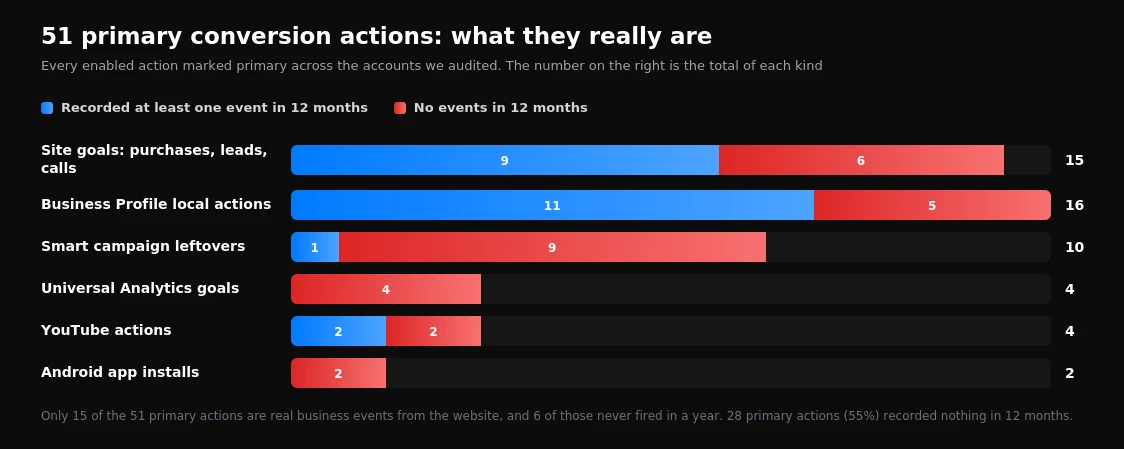
| Type of primary action | Count | No events in 12 months |
|---|---|---|
| Site goals: purchases, leads, calls | 15 | 6 |
| Business Profile local actions: directions, menu views, website visits, other engagements | 16 | 5 |
| Smart campaign leftovers | 10 | 9 |
| Universal Analytics goals | 4 | 4 |
| YouTube actions: subscriptions, follow-on views | 4 | 2 |
| Android app installs | 2 | 2 |
| Total | 51 | 28 |
Google creates most of these actions automatically: when a Business Profile is linked, a Smart campaign is launched or YouTube is connected. Nobody deliberately marked them primary, which is exactly why nobody removes them.
In the audited accounts, local actions mostly stayed out of the "Conversions" column because the campaigns do not use the corresponding goals. But they remain primary at account level, and any new campaign launched with account-default goals can start optimising towards directions and menu views just as it would towards leads.
Open Goals → Summary and filter to primary actions. Anything that is not a purchase, a lead, a qualified call or a CRM deal stage should be made secondary or disabled. For campaigns where accuracy matters, set campaign-level goals instead of relying on account defaults.
Failure 2. Dead goals that are still primary
28 primary actions (55%) recorded no events at all in 12 months. Some of them are harmless clutter, such as installs of an app that does not exist. But some are dangerous.
Four Universal Analytics goals are still marked primary, even though standard Universal Analytics stopped processing data back in July 2023. Six site goals, covering purchases, quote requests and form submissions, also did not fire once in a year. In half of the audited accounts, between zero and two conversions were recorded over the whole year, which means there is simply nothing for bidding to optimise towards.
The danger is that a dead primary goal looks like working tracking. The report shows "Website lead", the status is active, and nobody notices that the count for the year is zero. Meanwhile the campaigns run blind.
Most often after a website update. A form, a thank-you page or the CMS changes, the event stops firing, and nothing turns red in the interface. The second cause is the Universal Analytics to GA4 migration, when new conversions were created but the old ones were never disabled and nobody checked that the new ones actually count.
Failure 3. The "All conversions" column inflates the report several times over
Google Ads has two columns that are easy to confuse: "Conversions" and "All conversions". The first contains only actions used for optimisation. The second contains everything, including Business Profile local actions, YouTube actions and secondary events.
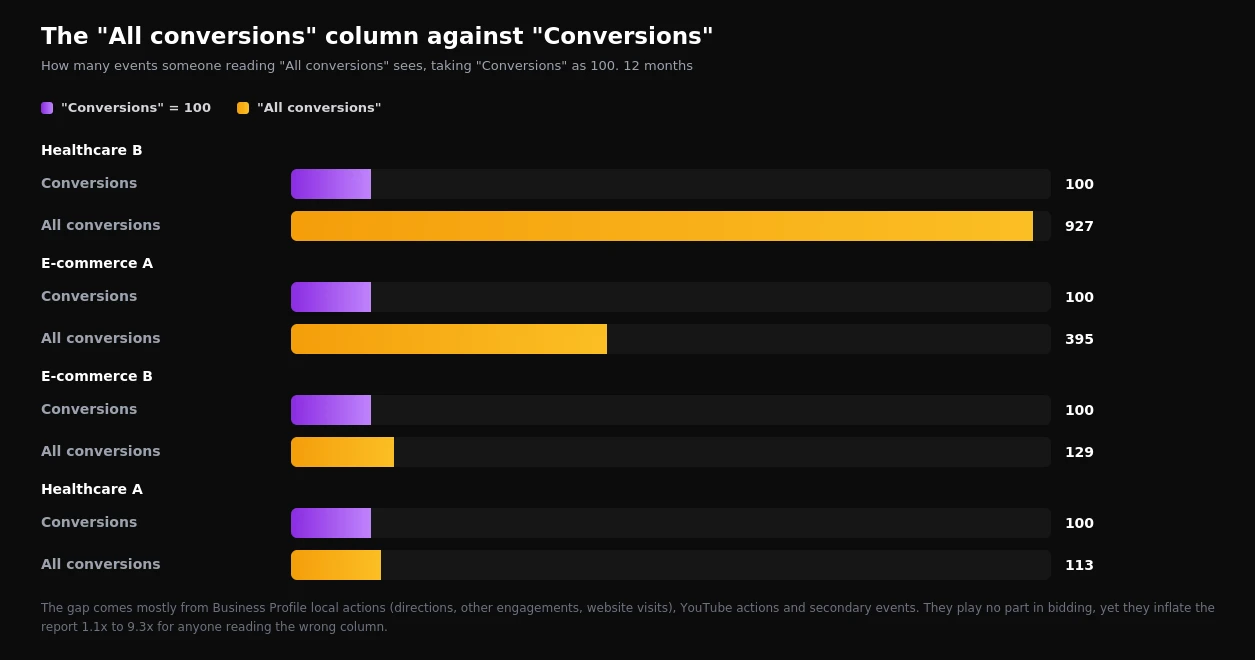
In Healthcare B, "All conversions" is 9.3 times the real figure: 2,786 of 3,153 events are other Business Profile engagements and website visits from the profile. In one of the stores, "All conversions" is four times higher, mostly because of 13,000 local actions.
For the algorithm this is not a problem, since it looks at the right column. It is a problem for people: an owner who sees "All conversions" in a report, a dashboard or Looker Studio gets a cost per conversion several times better than reality, and makes budget decisions on that basis.
Failure 4. Duplicates, and two sources for one purchase
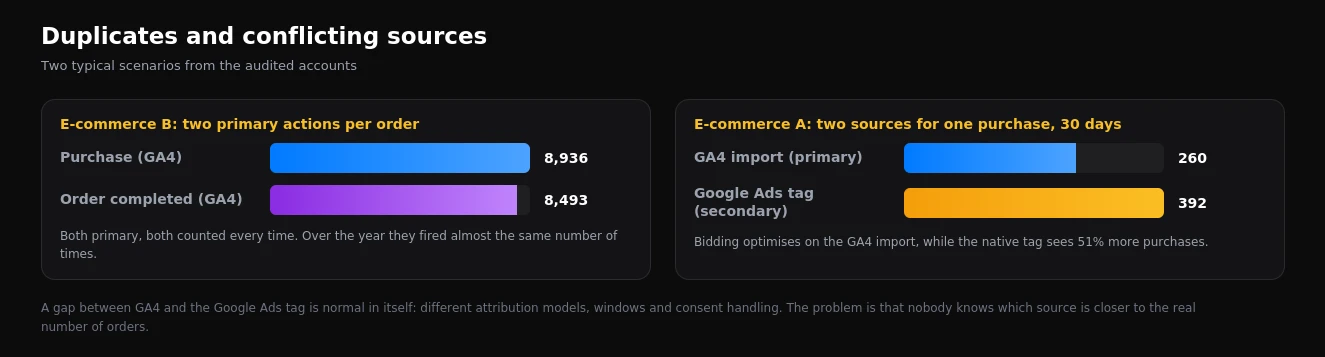
In E-commerce B, two GA4 actions are marked primary: purchase and order completed. Both are counted "every conversion". Over the year the first fired 8,936 times and the second 8,493 times. The numbers are almost identical, meaning practically every order produces two conversions. The "Conversions" column for the year shows 14,521. If the purchase count is close to the real number of orders, the reported cost per conversion in this store looks roughly 1.6 times better than it is.
E-commerce A has the opposite problem. The primary conversion is a purchase imported from GA4. Alongside it runs a native Google Ads tag for the same purchase, marked secondary. Over the last 30 days the GA4 import recorded 260 purchases and the tag recorded 392. Bidding is learning from the source that sees a third fewer orders.
Which of the two is closer to the truth cannot be determined from inside the ad account. GA4 and the Google Ads tag handle cookie consent, attribution and windows differently. Only reconciling both against the order count in the CMS or CRM for the same period gives the answer.
One business event, one primary conversion action. If both GA4 and the Google Ads tag count purchases, keep the source closer to real orders as primary and the other as secondary for control. Reconcile both against the CMS once a month.
Failure 5. Leads are counted "every", not "one per click"
Google offers two counting methods: "every conversion" and "one conversion per click". For purchases the first is right, because a person can buy twice. For leads it is the second: if someone submits a form twice or taps a widget twice, that is still one potential customer.
In two of the healthcare accounts we audited, primary lead and call actions are set to "every conversion". That includes the account where we previously saw a fivefold jump in widget "leads" with no rise in spend. This counting method does not create the problem on its own, but it amplifies every repeat: double taps, resubmissions, technical duplicate events.
Failure 6. No Enhanced Conversions for Leads where they matter most
Enhanced Conversions for Leads let you send Google Ads a real customer from your CRM instead of a submitted form. In healthcare, services and B2B, that is the difference between optimising for spam and optimising for sales.
Among the audited accounts, the feature is enabled in exactly one. It is an online store, where leads as such do not exist. None of the lead generation accounts use it, and none import offline conversions either. Every healthcare account optimises on on-site events: widget requests, taps, calls. We covered how to send real customers back to Google Ads in detail in our Enhanced Conversions for Leads guide.
How to check your own account in 30 minutes
- Open Goals → Summary. Add columns for source, primary status, counting method and conversion window.
- Count the primary actions. If they include directions, menu views, YouTube subscriptions, app installs or Universal Analytics goals, those are the first to go.
- Find dead goals. Set a 90-day range and look for primary actions showing zero. Every zero is either an unnecessary action or broken tracking.
- Compare "Conversions" with "All conversions". If the gap exceeds 20%, find out where it comes from and check which column the business owner sees in their reports.
- Reconcile with reality. Take the number of orders or leads from the CMS or CRM for a month and compare it with primary conversions.
- Check the counting method. Leads and calls should be "one per click"; purchases should be "every".
- Check Enhanced Conversions. In conversion settings and tag diagnostics, confirm that data is actually arriving, not just that the switch is on.
| Failure | Symptom | What to do |
|---|---|---|
| Clutter among primary actions | Directions, YouTube or app installs set as primary | Make them secondary, use campaign-level goals |
| Dead goals | Zero events in 90 days | Disable, or fix the tracking |
| Inflated reports | "All conversions" far above "Conversions" | Build reports on "Conversions" only |
| Duplicates | Two primary actions for one event | One primary action per event |
| Conflicting sources | GA4 and the Google Ads tag disagree | Reconcile with the CMS, keep the closer one primary |
| Leads counted "every" | Lead actions set to every conversion | "One conversion per click" |
| Form instead of customer | No CRM data reaches Google Ads | Enhanced Conversions for Leads |
What this data does not prove
The audited accounts are a sample across different industries, not market statistics. We can see settings and event counts, but not the CMS or CRM of any of these businesses, so we cannot say how many orders and leads there really were.
The double-counting conclusion for Store B rests on two event counts matching, not on checking individual orders. Some "order completed" events may relate to other actions. But when two primary actions produce 8,936 and 8,493 events in a year, that is a reason to investigate, not to leave things as they are.
Most importantly, none of these failures shows that the advertising in these accounts was run badly. These are settings that accumulate over years and never get checked, because they are invisible in day-to-day work.
This continues our series of analyses based on audit data: earlier we covered seven findings on what holds advertising back and Performance Max against search. If you want the conversions in your account counted correctly, see what our conversion tracking setup includes, or start with a one-day Google Ads, GA4 and GTM audit.
Want results like this for your brand?
Get a free strategy call and a tailored proposal within one business day.
Get a Free Proposal