Sep 17, 2026
Google Ads Call Tracking: What Actually Gets Counted and How to Set It Up

For a clinic, a repair service, a law firm or any local business, a phone call is often worth more than a website form. People who call are usually closer to buying than people who leave an enquiry. And calls are exactly what Google Ads most often counts wrongly: as taps instead of conversations, several times per customer, or not at all.
Below are all the ways to count calls from Google Ads, where each one is available, what we see in accounts during audits, and how to set up call measurement so your ads learn from conversations rather than accidental taps.
0
built-in ways to count calls in Google Ads
0 of 5
require a Google forwarding number
0s
a typical call length threshold for a conversion
0.6%
of conversions at night on 18.7% of spend, where the conversion is a call
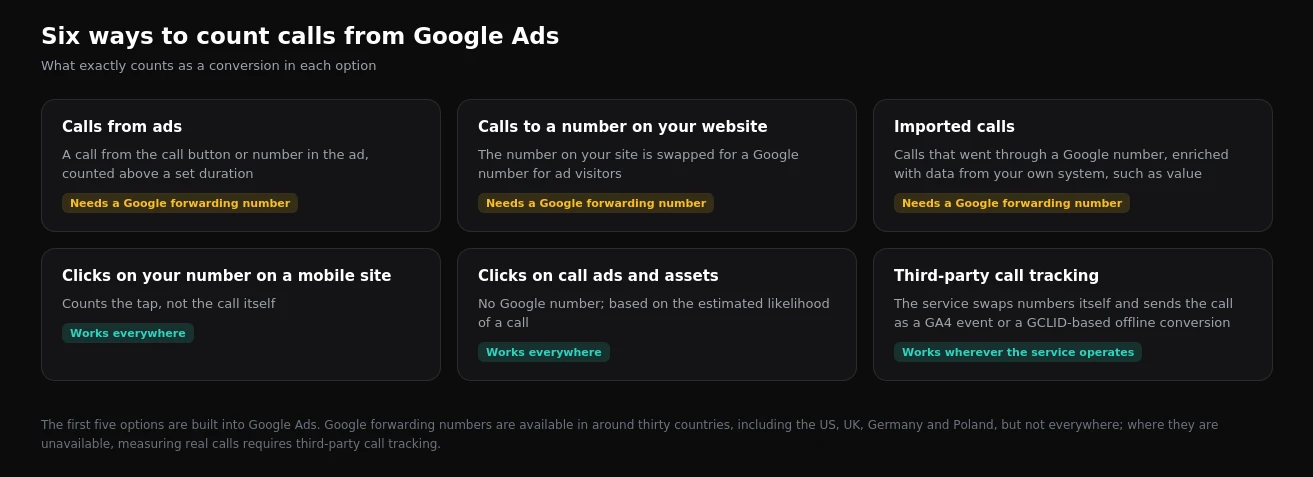
Google Ads has five built-in ways to count calls. The three most accurate work through Google forwarding numbers, which are available in around thirty countries, including the US, UK, Germany and Poland, but not everywhere. The other two count taps on a number or the likelihood of a call rather than the conversation itself. Where forwarding numbers are unavailable, measuring real calls requires third-party call tracking that passes the call to GA4 or Google Ads tied to the click. The core rules: one primary action for calls, a duration threshold, "one conversion per click", and taps on a number as a secondary action only.
Six ways to count calls
1. Calls from ads
Someone calls straight from the ad: through a call ad, a call asset or a location asset. The ad shows a Google forwarding number, so the system knows the call length and counts a conversion only above a set threshold, typically 60 seconds. This is the most accurate method for calls from search, provided forwarding numbers are available in your country.
2. Calls to a number on your website
For visitors arriving from ads, the number on your site is automatically swapped for a Google number. A call to that number is tied to the click and counted by duration. This also requires forwarding numbers.
3. Imported calls
Calls that went through a Google number can be enriched with data from your own system: marking which ones became sales and passing a value. This only works together with forwarding numbers.
4. Clicks on your number on a mobile site
This counts a tap on a number, button or phone link. The call itself is not tracked: the person may have tapped and changed their mind, failed to get through, or called a different number. It is available everywhere, but it is a signal of intent, not a conversation.
5. Clicks on call ads and assets
Without a Google number, the system counts taps on call elements in ads and estimates the likelihood that a call took place. It is available everywhere, but it is an estimate, not a fact.
6. Third-party call tracking
A call tracking service swaps numbers on your site itself: a separate number per visitor or per source. When someone calls, the service knows which click they came from, how long the conversation lasted and whether it was answered. The call is then passed on as a GA4 event imported into Google Ads, or as an offline conversion keyed to the click identifier. Where Google forwarding numbers are unavailable, this is the main way to measure real calls.
What we see in accounts during audits
We exported conversion settings from every audited account and looked at what is being called a call. It turned out the word covers four different things:
- Call actions left over from Smart campaigns. Primary, yet they recorded zero or one call in a year.
- Call clicks from the Business Profile. Google creates them automatically, they are primary, and in one store these "conversions" added up to 175 in a year.
- Taps on a website phone number, marked primary alongside form leads.
- Calls from call tracking passed through GA4. The only option that counts real conversations. But in one healthcare account that event is counted "every conversion", and in another the answered-call event is set as primary and did not fire once in a year.
More on these and other failures in our breakdown of conversion tracking.
Calls depend on opening hours
Calls have one more trait that is rarely accounted for. Google Ads assigns a conversion to the time of the click. Someone who clicks an ad at night or on a Sunday, when the business is closed, often never calls. A form or widget request, on the other hand, gets left straight away.
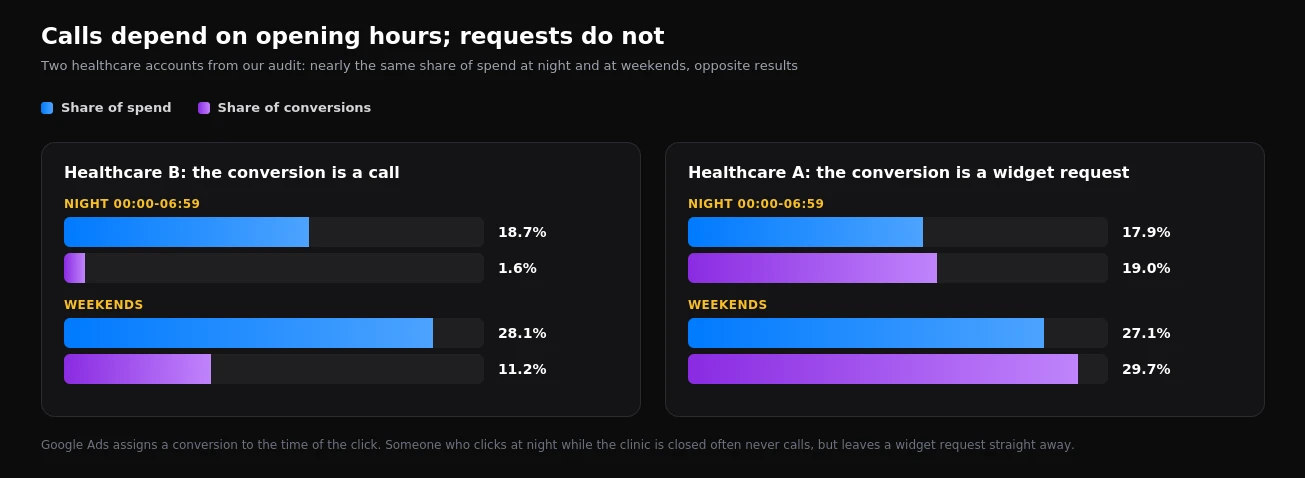
In two healthcare accounts we audited, almost the same share of budget is spent at night and at weekends. Where the conversion is a call, night-time brings 1.6% of conversions on 18.7% of spend, and weekends 11.2% on 28.1%. Where the conversion is a widget request, night-time brings 19% of conversions and weekends almost 30%. We looked at this in detail in our article on ad scheduling.
The practical conclusion: if your primary conversion is a call, either limit ads to opening hours or give people an out-of-hours alternative: a callback form, a messenger or online booking.
How to set up call measurement properly
- Define a qualified call. Usually an answered call from a unique caller lasting longer than 30-60 seconds. Short calls, missed calls and repeat calls from the same number are not conversions.
- Choose the method. If Google forwarding numbers are available in your country, use calls from ads and calls to a website number. Otherwise, use third-party call tracking feeding GA4 or Google Ads.
- Keep one primary action for calls. Make taps on a number, Business Profile call actions and Smart campaign leftovers secondary, or disable them.
- Set "one conversion per click". Someone who called three times is still one potential customer.
- Pass quality from the CRM. If staff mark which calls became bookings or sales, send those stages to Google Ads with a value, as described in our Enhanced Conversions for Leads guide.
- Test with a real call. Click an ad, call, talk for longer than the threshold, and check that the conversion appears in GA4 and Google Ads against the right campaign.
How to choose a call tracking service
If Google forwarding numbers are unavailable in your country, or you need call recordings and CRM data, choose a call tracking service not on the price per number but on what it can pass on:
- Visitor-level dynamic number insertion, not just static numbers per source. Otherwise a call cannot be tied to a specific click and campaign.
- Integration with GA4 and Google Ads: sending the call as an event or as an offline conversion keyed to the click identifier.
- Call duration, status and uniqueness in the data it sends, so short, missed and repeat calls can be filtered out.
- Quality tagging: a way for staff to mark that a call became a booking or a sale.
- A CRM connection, so the call becomes a lead together with its advertising data.
- A number pool large enough for your traffic, with transparent pricing.
Which metrics to watch after setup
A month after launch, compare qualified calls in your call tracking tool with call conversions in Google Ads: the gap should be small and explainable. Check the share of missed calls by hour, which often reveals ads running at times when nobody answers. And calculate cost per qualified call separately from cost per form lead: they differ in quality, and blending them into one average cost per lead hides that.
Common mistakes
| Mistake | Consequence |
|---|---|
| Taps on a number as the primary conversion | Bidding optimises for intent, not conversations |
| No call length threshold | Misdials and short calls count as leads |
| Calls counted "every conversion" | Repeat calls from the same customer inflate the numbers |
| Several primary call actions at once | One call is counted two or three times |
| Ads running 24/7 with a call conversion | Out-of-hours budget produces almost no calls |
| A call tracking number pool that is too small | Calls get attributed to the wrong clicks |
Frequently asked questions
Can I use call assets where Google forwarding numbers are unavailable?
Yes, you can still show a number in your ads. Only the forwarding numbers are unavailable, so Google counts conversions from those calls based on taps and estimates rather than actual call duration.
How many numbers do I need for dynamic call tracking?
It depends on how many ad visitors are on your site at the same time. A number is assigned to a visitor for the session, and if there are fewer numbers than simultaneous visitors, calls start being attributed to the wrong sources. Call tracking providers usually size the pool from your traffic.
What if we get few calls and bidding lacks data?
Add form leads and callback requests as primary conversions with different values, and keep taps on a number as secondary for analysis. That gives bidding enough signal without optimising towards accidental taps.
If calls are your main lead channel and you want Google Ads to count conversations rather than taps, see what our conversion tracking setup includes. And to understand what your account is counting right now, start with a one-day Google Ads, GA4 and GTM audit.
Want results like this for your brand?
Get a free strategy call and a tailored proposal within one business day.
Get a Free Proposal