Aug 24, 2026
How to Stop YouTube Ads Budget Leaks and Fix Your ClickFunnels to GA4 Attribution

YouTube Ads driving traffic into a ClickFunnels page is one of the most common setups for coaching, real estate, and investment offers, and one of the most common places for tracking to quietly fall apart. ClickFunnels was never built to talk to Google Tag Manager and GA4 natively, and YouTube's placement network was never built to protect your budget by default. Put those two things together without an audit and you get a funnel that looks like it's running fine while leaking spend and losing half your conversion data at the same time.
3
places this funnel typically breaks: placements, opt-in tracking, attribution settings
GVP
Google Video Partners - the most common source of low-quality, unexcluded spend
1
data layer connecting YouTube, ClickFunnels, and GA4 - when it's built correctly
0
duplicate conversions once dedup and auto-tagging are actually verified
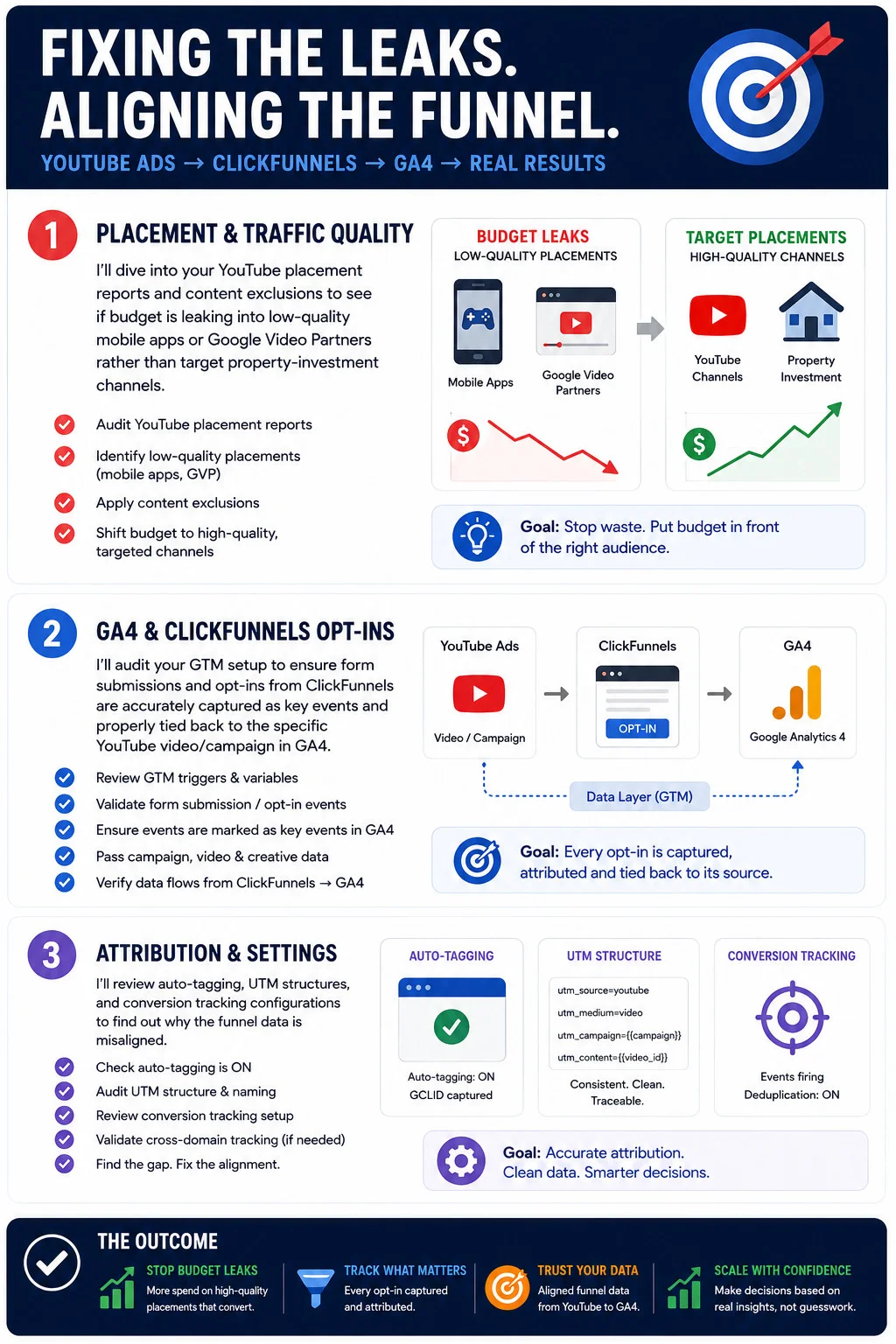
Step 1: Audit Placement and Traffic Quality
The first place to look isn't your landing page, it's the YouTube placement report. Campaigns that run without content exclusions routinely bleed a meaningful share of budget into low-quality mobile apps and Google Video Partners inventory, placements that generate impressions and clicks but rarely produce a buyer for a coaching offer or an investment property. None of that shows up as an obvious problem in a top-line dashboard. It shows up as a cost-per-lead that never quite makes sense.
- Pull the placement report for every active campaign and sort by spend, not by conversions - the leak is usually invisible in a conversion-sorted view.
- Flag low-quality placements, especially mobile game apps and Google Video Partners inventory outside YouTube itself.
- Apply content exclusions at the campaign level so future spend stops flowing to the same low-quality inventory.
- Redirect budget toward targeted channels that actually match your audience, whether that's specific YouTube creators or topic-relevant content categories.
The goal here is simple: stop paying for impressions that were never going to convert, and put that budget in front of an audience that actually looks like your buyer.
Step 2: Fix GA4 and ClickFunnels Opt-In Tracking
This is where most YouTube-to-ClickFunnels funnels quietly lose the thread. ClickFunnels captures the opt-in. GA4 is supposed to record it as a conversion. Google Tag Manager is supposed to be the layer connecting the two. When any part of that chain isn't configured deliberately, the funnel keeps generating leads while your reporting keeps showing that nothing happened.
- Review the GTM triggers and variables actually firing on your ClickFunnels pages, not just the ones documented from setup.
- Validate the form submission and opt-in events by submitting a real test lead and watching it appear in GTM's preview mode.
- Confirm those events are marked as key events in GA4, not just logged as generic events nobody built a report around.
- Pass campaign, video, and creative data through so a conversion in GA4 can be traced back to the specific YouTube video and campaign that generated it, not just "YouTube" as a channel.
- Verify the full path from ClickFunnels through to GA4, end to end, rather than trusting that each piece works because it was configured once.
Done right, every opt-in is captured once, attributed to the exact video that produced it, and visible in GA4 without anyone needing to cross-reference two dashboards to find out what actually happened.
Step 3: Fix Attribution and Account Settings
The last layer is the one most accounts never check until something looks obviously wrong: auto-tagging, UTM structure, and conversion tracking configuration. Misaligned settings here don't just create messy reports, they actively misattribute results to the wrong campaign or lose the connection entirely.
- Confirm auto-tagging is on and that the GCLID is actually being captured on landing, not silently dropped somewhere in the redirect chain.
- Audit your UTM structure and naming for consistency - a campaign tagged three different ways across three different pages fragments your data into pieces that don't add back up.
- Review the conversion tracking setup itself, including whether deduplication is actually on and working, not just enabled in a settings panel.
- Validate cross-domain tracking if YouTube traffic passes through a redirect domain before landing on your ClickFunnels page - this is one of the most common silent breakages in exactly this kind of funnel.
- Find the specific gap, then fix the specific alignment. A funnel audit that ends at "something's off" hasn't actually finished.
What Fixing All Three Actually Gets You
The outcome of tightening placement quality, opt-in tracking, and attribution settings together is bigger than any one fix on its own. Budget stops leaking into inventory that was never going to convert. Every opt-in gets captured and attributed instead of vanishing into an unexplained gap between ClickFunnels and GA4. The data GA4 shows you actually matches what happened, aligned all the way from the YouTube video someone clicked to the lead that landed in your CRM. And once you can trust that chain, scaling the campaigns that work stops being a guess.
This exact audit, placements, GTM triggers, GA4 key events, UTM structure, and cross-domain tracking, is what our GTM setup and GA4 setup services are built to run before you scale another dollar of YouTube spend into a funnel you can't fully see.
Want results like this for your brand?
Get a free strategy call and a tailored proposal within one business day.
Get a Free Proposal