Sep 28, 2026
Google's September 2026 Spam Update: What to Check on Your Site Right Now

On 24 September 2026, Google launched its September spam update. It is the fourth such update this year and the longest: the rollout may take up to two weeks, while the previous three finished within one to three days. Google announced no new policies, so the change is to the automated systems that detect spam under existing rules.
For most sites a spam update passes unnoticed. But if a site has mass-produced template pages, paid links or traces of a hack, now is when they may cost rankings. Below: what is known about the update, what it targets, how to check your site, and what to do if traffic drops.
0th
Google spam update of 2026
up to 0 weeks
for the rollout
Sep 0
start date
0
new spam policies
The September spam update began on 24 September, applies to all languages and countries, and may take up to two weeks to roll out. There are no new policies: Google improved automated detection under its existing spam policies. Ordinary business sites are most often hit through mass-produced "service + city" template pages, doorway pages, paid links and hacked content. Compare traffic only once the rollout is complete. If your site is affected, it is not a manual action: there is no reconsideration request. You remove the cause and wait for Google's systems to recognise it, which can take several months.
What is known about the September update
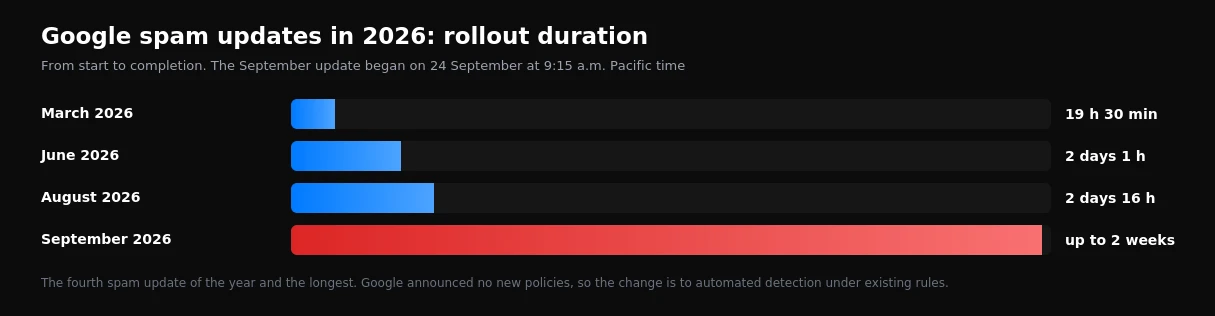
- Start: 24 September 2026 at 9:15 a.m. Pacific time.
- Scope: all countries and all languages.
- Duration: up to two weeks. For comparison, the March update took 19.5 hours, June about two days, August about three.
- No new policies. Google has not said which violation the update targets.
We covered the previous, August, update separately. The length of this one is unusual: long rollouts usually signal more substantial changes to detection systems, so sites with risky practices should pay closer attention than usual.
Spam update, core update and manual action: the difference
| Spam update | Core update | Manual action | |
|---|---|---|---|
| What it is | Improved automated spam detection | A change to overall page quality assessment | A decision about the site by a Google employee |
| Where you see it | Drops in rankings and traffic | Rankings redistributed across results | A notice in Search Console |
| What to do | Remove the violation and wait | Improve how useful the content is | Fix it and request reconsideration |
What most often hits business sites
Mass-produced template pages
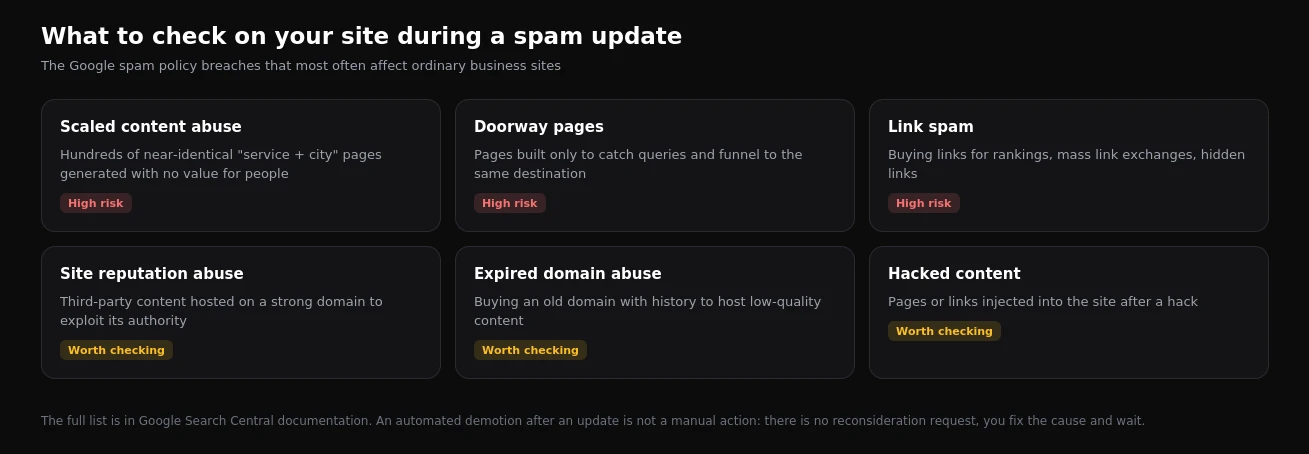
The most common risk for service businesses is hundreds of "service + city" pages where only the city name changes. Google treats them as scaled content abuse when they exist for rankings rather than for people. On one project we worked on, the site had several hundred such city pages. We removed 434 of them, redirecting to relevant pages, and planned unique content for the 22 regional centres that remained: local conditions, real prices, contact details.
Doorway pages
Pages that exist only to catch search queries and send the visitor to the same destination. Often these are the same city template pages, or a page per query variant with identical content.
Paid and exchanged links
Links bought for rankings without rel="sponsored" or rel="nofollow", mass link exchanges and site networks. Guest posts are not spam in themselves, but paid links within them must be marked.
Site reputation abuse, expired domains, hacks
Third-party content hosted on a strong domain to borrow its authority; buying an old domain with history to host low-quality content; pages and links injected after a hack. The last one is especially insidious: site owners often do not know they have thousands of spam pages.
How to check whether you were hit
- Wait for the rollout to finish. Rankings can fluctuate during a rollout, and conclusions are premature.
- Compare periods in Search Console. Two weeks after completion against two weeks before 24 September: clicks, impressions, positions.
- Look at which pages lost traffic. If template pages or a single section dropped, the cause is most likely there.
- Check the Manual actions and Security issues reports. They show manual penalties and signs of a hack.
- Check the number of indexed pages. An unexplained sudden jump often means a hack.
- Review your backlink profile. Especially if links were ever bought without markup.
What to do if traffic dropped
- Template pages: merge them, remove them with redirects, or rewrite them with genuinely useful unique content. Page count is not the goal.
- Paid links: ask for them to be marked
sponsoredor removed. The disavow file is a last resort, not a first reaction. - Hacks: clean the site, close the vulnerability, remove the spam pages and check the security report.
- Wait. Google says plainly that its systems may take several months to recognise the fixes.
Mass-delete pages in a panic, disavow every link in sight, or move the site to a new domain. These moves hurt more often than they help. Find the specific cause first, then fix exactly that.
What about advertising
Spam updates concern organic search and do not affect Google Ads directly. But there is an indirect link: when organic traffic drops, businesses usually compensate with ads, and cost per customer rises. A site free of risky practices is therefore also a long-term saving on advertising.
Frequently asked questions
Can a spam update hit a site with no spam?
That is not its purpose, but rankings can shift at the same time for other reasons: competitors, seasonality, technical problems. Look at which pages dropped before drawing conclusions.
Will a reconsideration request help?
Only for a manual action, which is shown in Search Console. An automated demotion after an update cannot be lifted by a request.
How long does recovery take?
From a few weeks to several months after the fix, depending on the scale of the problem and how often Google recrawls the site.
For a quick look at your site's technical state, use our free site check. The full list of what to review is in our technical SEO audit checklist, and if your site has already lost traffic, see how we work on SEO.
Want results like this for your brand?
Get a free strategy call and a tailored proposal within one business day.
Get a Free Proposal