Sep 22, 2026
AI Max for Search: The Complete Guide and What to Check Before the Automatic Upgrade

AI Max is the biggest change to Google Search campaigns in years, and also the easiest one to miss. It is not a new campaign type, not a separate button in the menu and not a separate budget. It is a set of features inside a regular Search campaign that lets the system decide for itself which queries to show on, what copy to write and which page to send people to.
From 1 September 2026 some campaigns move to AI Max automatically, and in February 2027 Dynamic Search Ads are migrated there by force. The question is no longer whether to switch it on, but whether the account will be ready when it switches itself. Below is how AI Max works, what stays under your control, what Google's numbers and independent data actually say, and exactly what to check in the account before the transition.
0
features that make up AI Max
+0%
more conversions promised by Google on activation
+0%
median rise in cost per conversion in an independent analysis
0
February: the forced DSA migration
Google expanded the AI Brief closed beta to seven more languages and announced a unified AI Max report that brings the search term, ad copy and landing page together. The relevant sections have been updated.
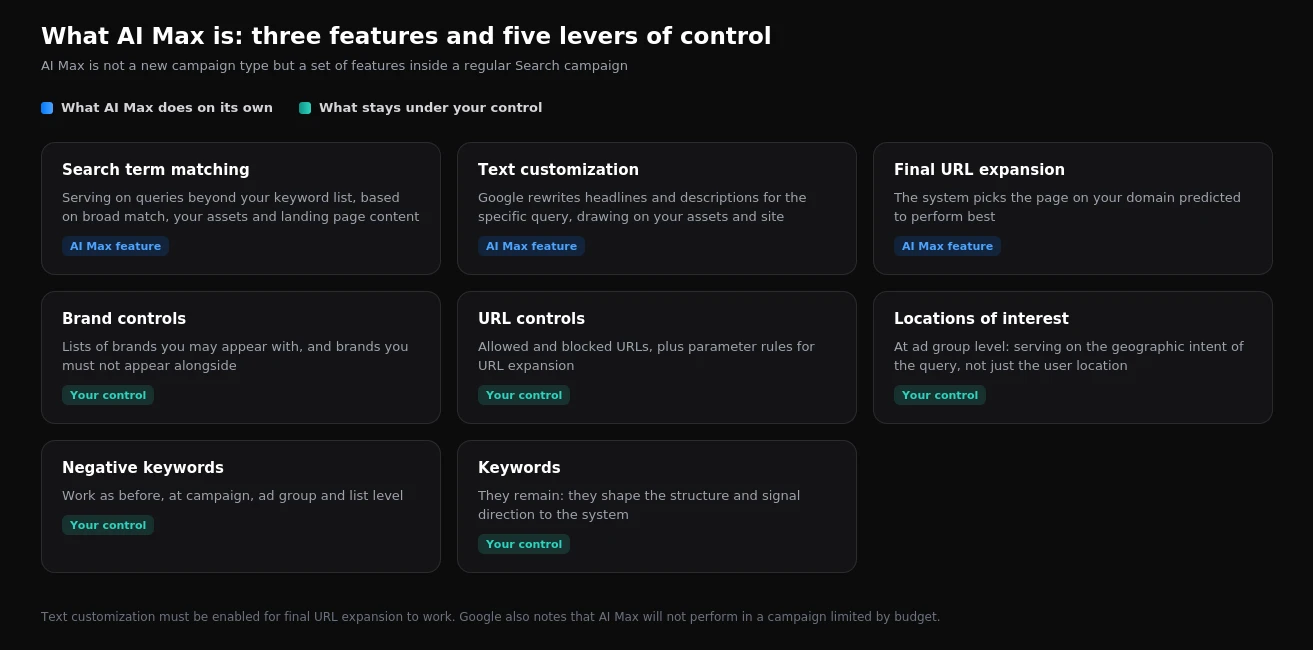
AI Max consists of three features: search term matching beyond your keyword list, text customization that rewrites ads for the query, and automatic landing page selection. Keywords and negatives do not disappear, and brand controls, URL controls and locations of interest are added alongside them. Google promises an average of 14% more conversions at a similar cost, rising to 27% for campaigns built mainly on exact and phrase match. An independent analysis of over 250 campaigns found a median revenue lift of 13% alongside a 16% median rise in cost per conversion. In the accounts we audited, 22% to 33.5% of spend already goes on queries that never convert, and AI Max expands matching further. So the real work is not switching the feature on: it is sorting out negatives, brand and landing pages before it switches itself on.
What AI Max is and what it contains
In plain terms: you keep your keywords and ads, and the system gains permission to go beyond them. It analyses your keywords, ad copy and site content, finds queries that are similar in meaning, rewrites headlines and descriptions for them, and chooses the page to send the visitor to.
Search term matching
The most important part. Google serves ads on queries that are not in your list, drawing on broad match, your assets and landing page content. Keywords do not disappear: they still shape campaign structure and signal direction to the system. But the list stops being the boundary.
Text customization
The system rewrites headlines and descriptions for the specific query, using material from your assets and site pages. For some businesses that is a gain, because the copy sits closer to the query. For others it is a risk: in healthcare, finance and legal services, wording is regulated, and uncontrolled paraphrasing can be a problem.
Final URL expansion
Instead of your chosen landing page, the system may send someone to another page on your domain that it predicts will perform better. This feature only works together with text customization. It is the one that surprises advertisers most: traffic suddenly lands on blog posts or old catalogue sections.
What stays under your control
| Control | What it does | When it is essential |
|---|---|---|
| Negative keywords | Work at campaign, ad group and list level, as before | Always |
| Brand controls | Lists of brands you may appear with, and brands you must not appear alongside | If you have your own brand or strong competitors |
| URL controls | Allowed and blocked URLs, plus parameter rules | If your site has pages ads must not lead to |
| Locations of interest | Serving on the geographic intent of the query, at ad group level | For local businesses and service areas |
| Keywords | Shape the structure and set the system's direction | Always |
| AI Brief (closed beta) | Guidance in your own words: what to say, which queries to avoid, who to address | When tone and wording boundaries matter |
Google introduced AI Brief at the end of April 2026. It is an attempt to let advertisers steer the system in ordinary language: describe the business, set matching boundaries and define the audience. On 23 September 2026 Google expanded the AI Brief closed beta from English to seven more languages: Dutch, French, German, Italian, Japanese, Portuguese and Spanish. Access is still invitation-only, so it is not yet something to rely on in every account.
The calendar: when the choice disappears
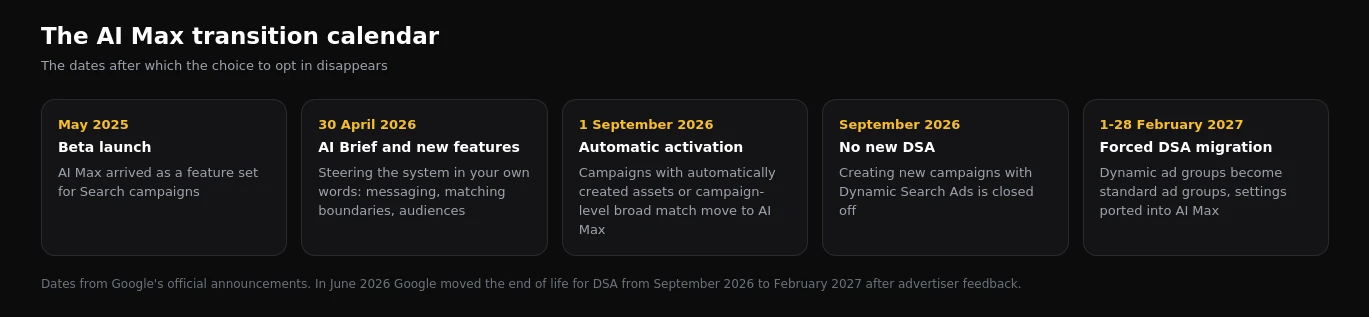
From 1 September 2026, campaigns with automatically created assets or campaign-level broad match enabled move to AI Max automatically. We covered this separately in our piece on the automatic upgrade.
New campaigns with Dynamic Search Ads can no longer be created after September 2026. Existing DSA keep running until February 2027, when they are migrated by force: dynamic ad groups become standard ad groups and settings are ported into AI Max. The details and a preparation plan are in our article on the DSA migration.
It is also worth remembering that in autumn 2026 Google removed campaign-level language targeting from Search. Together with expanded matching, that means two familiar limits on reach are gone. We covered it in our analysis of the language targeting change.
What the numbers say
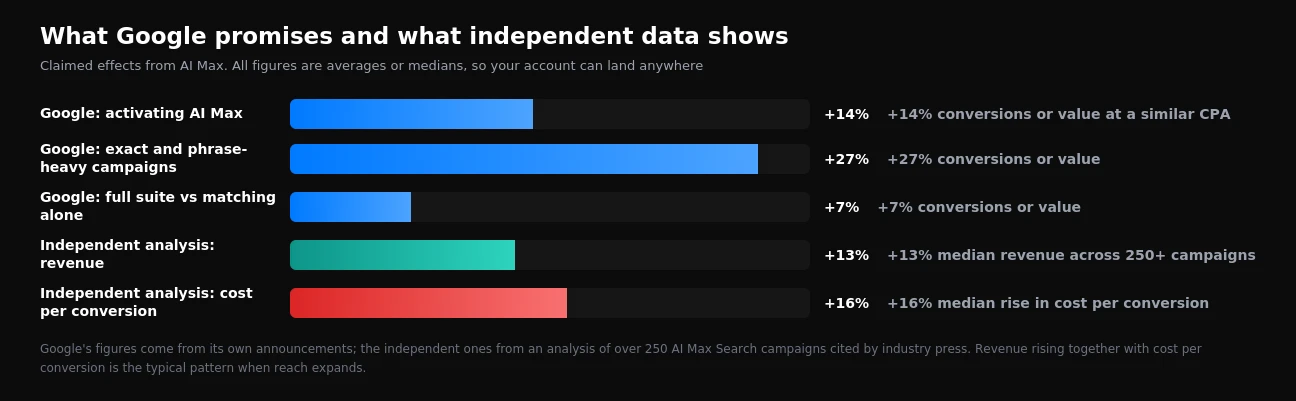
Google cites three figures. Advertisers who activate AI Max see on average 14% more conversions or conversion value at a similar cost per conversion. For campaigns that relied mainly on exact and phrase match, the lift reaches 27%. And the full feature suite delivers 7% more than search term matching alone.
An independent analysis of more than 250 AI Max Search campaigns, cited by industry press, paints a different picture: a median revenue lift of 13% alongside a median 16% rise in cost per conversion.
There is less contradiction here than it seems. Both describe the same thing: reach expands, sales grow, and each additional conversion costs more. The only question is whether that price works for your business.
Every number above is an average or a median across a large sample. None of them says anything about your account. Half the advertisers in any such study did worse than the median. The only figure that matters is your own, measured before and after, with seasonality and branded traffic taken into account.
What AI Max does to a messy account
This is the most important part, and the one usually skipped. AI Max does not create problems from nothing; it amplifies the ones already there.
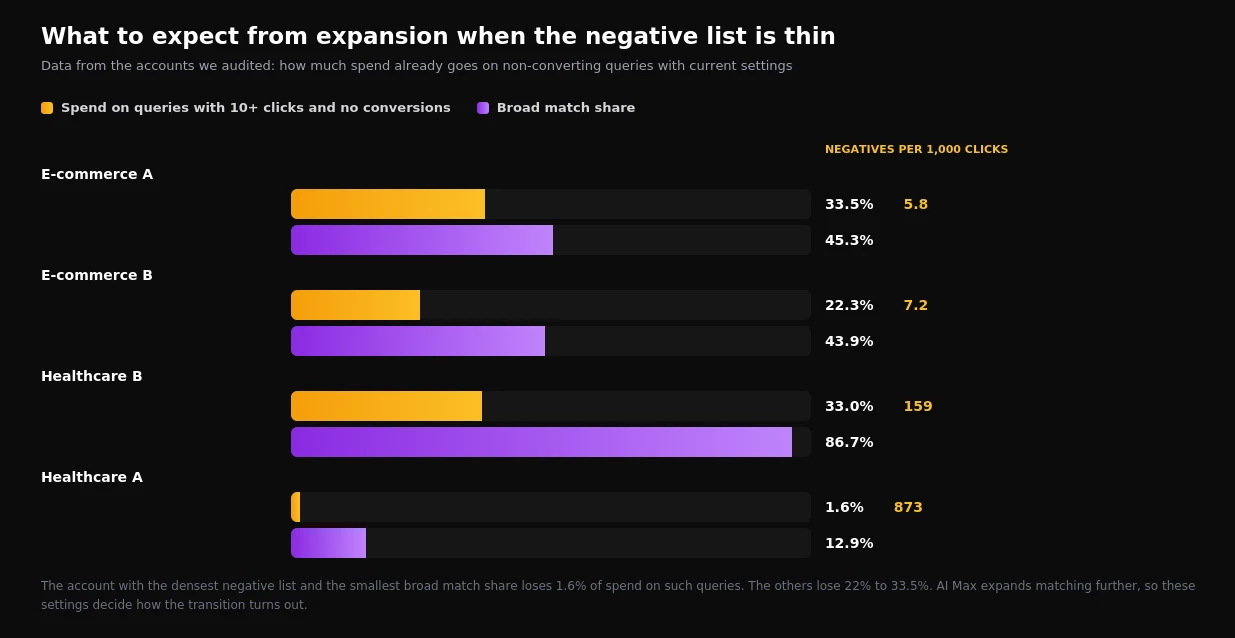
We exported data from the accounts we audited and looked at how much spend already goes on queries that gathered ten or more clicks without a single conversion. In the account with the densest negative list and the smallest broad match share, that is 1.6% of spend. In the others it runs from 22.3% to 33.5%. The full breakdown by category is in our analysis of search queries.
What that means for an AI Max transition:
- A thin negative list. If the system already brings in queries with no product word, expanded matching brings more of them. In one store, two thirds of non-converting spend went on exactly those queries.
- No brand controls. In one account almost half of search campaign conversions came from queries containing the store's own name. Without brand lists, AI Max easily grows that share and reports a flattering cost per conversion that adds nothing to the business.
- Weak landing pages. URL expansion will send people to pages you never prepared for advertising: blog posts, outdated sections, pages with no prices or forms.
- Broken conversion tracking. If conversions are counted wrongly, the system learns from the wrong signal across wider traffic. In the audited accounts, 55% of primary conversion actions recorded no events in a year; details are in our breakdown of tracking failures.
Three weeks of preparation: a step-by-step plan
Week 1. Clean-up
- Export the search terms report for 12 months and sort queries with 10+ clicks and no conversions by cost.
- Add to negatives everything that cannot become a customer under any circumstances: queries with no product word, jobs, free, training, and other companies' names with "website", "address" or "phone".
- Check conversions: one business event, one primary action; leads counted one per click; dead goals disabled.
- Record your baseline: cost per conversion, conversion volume, and separately the same figures excluding branded queries.
Week 2. Controls
- Set up brand controls: your own brand, and brands you must not appear next to.
- Define URL controls: which pages may be used for expansion and which may not. Blogs, careers pages and utility sections usually need excluding.
- For local businesses, review locations of interest at ad group level.
- Review the copy: in a regulated niche, add mandatory wording and confirm the system cannot rewrite it freely.
Week 3. Launch and measurement
- Switch AI Max on for one or two campaigns with enough conversions to judge, not the whole account at once.
- Make sure the campaign is not limited by budget: Google states plainly that AI Max will not deliver in a budget-limited campaign.
- Leave it alone for two to three weeks. Any new matching needs a learning period.
- Review the search terms report weekly: AI Max appears there as its own match type, so you can see exactly the traffic the system added.
How to judge the result honestly
The most common mistake in evaluation is comparing the month before with the month after on overall cost per conversion. That number blends brand, seasonality and the residual effect of older campaigns.
| What to measure | How |
|---|---|
| Non-branded cost per conversion | Remove branded queries from both periods and compare only the rest |
| AI Max contribution | Segment by match type in the search terms report |
| Lead quality | Reconcile with the CRM: how many new enquiries became customers |
| Where traffic went | Landing page report before and after URL expansion was enabled |
| Seasonality | Comparison with the same period last year, where data exists |
The new unified AI Max report
On 23 September 2026 Google announced a dedicated AI Max report. It is meant to show the whole journey in one place: which search term triggered the ad, which version of the copy the person saw, and which page of the site they landed on. Today those three things have to be stitched together by hand from the search terms report, the asset report and the landing page report.
Google has not given a launch date, promising details and availability later in 2026. Until the report arrives, the evaluation plan in the previous section still applies. Once it does, the first things to check there are where URL expansion is sending traffic, and which automatically rewritten copy is serving on your most expensive queries.
Who AI Max suits, and who should be careful
It suits online stores with wide ranges and many pages, businesses with seasonal or shifting demand, accounts that have exhausted growth on their existing keywords, and anyone who previously relied on DSA.
Be careful in regulated niches where ad wording matters; on small budgets where the campaign is already constrained; when the site has few pages and URL expansion has little to choose from; and when conversion tracking has not been sorted out yet.
The worse an account is set up, the bigger the lift automation promises, and the more expensive whatever it pulls in turns out to be. Basic hygiene first: negatives, brand, conversions, landing pages. Expansion second.
Common mistakes during the transition
| Mistake | Consequence |
|---|---|
| Switching it on across all campaigns at once | Nothing to compare against; the cause of any change is unclear |
| Skipping brand controls | Growth comes from your own brand and reporting flatters reality |
| Leaving URL expansion unrestricted | Traffic lands on blogs and utility pages |
| Judging after a week | The learning period is not over |
| Comparing overall cost per conversion | The figure blends brand and seasonality |
| Leaving negatives untouched | Expansion pulls in the same irrelevant themes, only wider |
Frequently asked questions
Can AI Max be switched off after an automatic activation?
The AI Max features in Search campaigns are controllable: search term matching, text customization and URL expansion can be turned off in campaign settings. The exception is Dynamic Search Ads after February 2027: there will be no going back, because the format itself will no longer exist.
Does AI Max replace Performance Max?
No. AI Max works inside Search campaigns and serves on search. Performance Max is a separate campaign type spanning all Google channels. We compared the two approaches on our own data in PMax against search.
Are keywords still needed with AI Max?
Yes. They shape campaign structure and give the system direction. An account without keywords deprives the system of the clearest signal about what you sell.
How long does an evaluation take?
At least two to three weeks without changes, and a month or more for businesses with long sales cycles, since some conversions arrive with a delay.
Does AI Max change bidding?
No, the bidding strategy stays yours. AI Max affects which queries you appear on, what copy people see and which page they land on.
What this article does not claim
We have not tested AI Max across every industry and have no large sample of our own specifically on it: the lift figures above come from Google and from an independent analysis, not from our own measurement. Our own data covers something else: the state of accounts before the transition, which is what the preparation section is based on.
The automatic transition dates come from Google's official announcements, but Google has already moved the DSA deadline once, so they may shift again. Check the notifications in your own account.
If you want to know what state your account will meet AI Max in, we check negatives, brand, structure and tracking as part of a one-day Google Ads, GA4 and GTM audit. And if conversions need sorting out before any expansion, see what our conversion tracking setup includes.
Want results like this for your brand?
Get a free strategy call and a tailored proposal within one business day.
Get a Free Proposal