Oct 1, 2026
Search Console AI Overviews Report: How to Track AI Mode Impressions and When to Opt Out

For a long time site owners had no way to know whether Google cited them in AI Overviews and AI Mode. Those impressions were buried in the overall Search Console data. Now Search Console has a dedicated generative AI report: it shows how many times links to your site appeared in Google's AI answers, on which pages, in which countries and on which devices.
Alongside the report came a setting that removes your site from AI answers entirely without losing regular search. Below: what the report contains, what it leaves out, how to read it, and when it makes sense to click Exclude.
0
AI formats in the report: AI Overviews and AI Mode
0
metric: impressions only, no clicks
0 days
roughly how long an AI opt-out takes to apply
0
AI assistant sessions on our English site in September
Search Console now has a generative AI performance report. It counts impressions of links to your site in AI Overviews and AI Mode and breaks them down by page, country, date, device and search type (text or multimodal). It does not include clicks or search queries. The report launched on 3 June 2026 and has been available to all sites since 31 August. A new "Search generative AI" setting is set to Include by default; switching to Exclude removes the site from AI Overviews, AI Mode and Discover AI summaries within 1-2 days without affecting regular rankings.
What the report shows
The report sits in the Performance section next to the regular Search report. There is one main metric: impressions. An impression is counted when a link to your site appears in an AI answer that a user saw. If one answer contains several links to your site, that counts as a single impression.
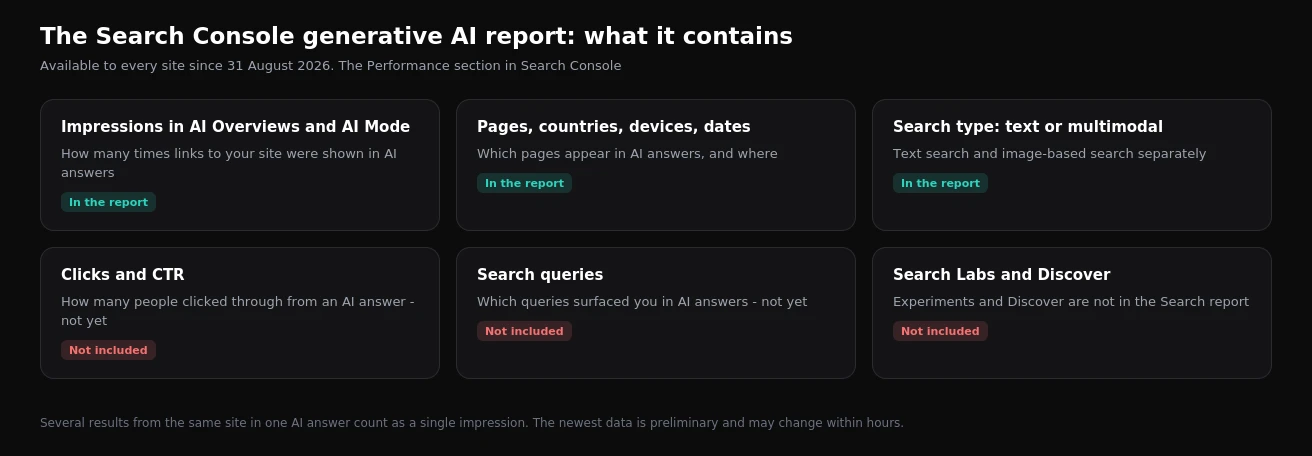
Impressions can be broken down by five dimensions:
- Pages. Which URLs appear in AI answers. The report shows the canonical URL.
- Countries. Where exactly you are being cited.
- Dates. Daily trend. The newest data is preliminary and can change.
- Devices. Mobile, desktop, tablet.
- Search type. A regular text query or a multimodal one, where someone searches with an image or combines a photo and text.
What the report does not show
This is the important part. The report answers "do people see me in AI answers", not "does it bring traffic".
- No clicks or CTR. Google still counts clicks from AI Overviews and AI Mode inside the overall Search report, together with regular results. You cannot separate them.
- No search queries. You see the page, but not the question Google answered with it.
- No Search Labs or experiments. Experimental AI features are not included.
- Discover is separate. AI summaries in Discover have their own report.
In GA4 the "AI Assistant" channel covers visits from ChatGPT, Perplexity and similar services. Clicks from AI Overviews and AI Mode do not land there: they arrive as regular Google organic traffic. So GA4 data and the new Search Console report cannot be compared directly.
What we see on our own sites
We run two blogs, one in English and one in Ukrainian. In September the English site got 25 sessions from organic search and 9 from AI assistants, all 9 from ChatGPT. In August there were no AI referrals at all. On the Ukrainian site the ratio was 7 to 2.
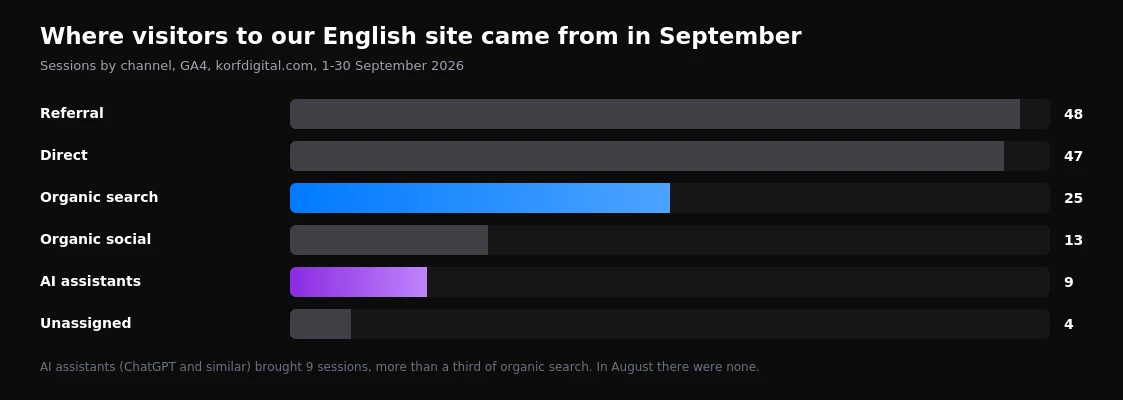
The numbers are small and the sites are young, but the trend is telling: for a new site, AI assistants already bring more than a third as much as organic search. That is exactly why a separate report on Google AI impressions is useful: it covers a blind spot GA4 cannot see.
How to read the report: 4 practical scenarios
- Find your "AI-visible" pages. Sort pages by impressions. The ones at the top are pages Google treats as a reliable source for answers. Update them first and never change their URLs.
- Explain a CTR drop. If a page has many impressions in the AI report while clicks fall in the regular report at stable positions, people are most likely reading the answer right in Google. Add what an AI summary cannot give: a calculator, prices, case studies, a downloadable template.
- Find pages AI ignores. If a page ranks well but is missing from the AI report, the text is hard to quote. A direct answer at the top, tables, short paragraphs and an FAQ block help.
- Compare markets. The country breakdown shows where AI answers are already part of search in your niche and where they are not yet.
The "Search generative AI" setting: include or exclude
Search Console settings now have a "Search generative AI" option. The default is Include. If you choose Exclude, the site disappears from AI Overviews, AI Mode and Discover AI summaries within about 1-2 days. Regular search keeps working, and Google says rankings are not affected.
| Site type | Recommendation | Why |
|---|---|---|
| Services, local business | Keep | A mention in an AI answer is free brand exposure, and leads still come through the site or a call |
| Online store | Keep | AI answers increasingly compare products, and without you competitors fill the space |
| B2B, expert blog | Keep | Being cited by AI builds trust before the first contact |
| Media living off on-page ads | Test | If the AI summary fully replaces the article, you lose ad impressions |
| Paid content, reference sites | Consider excluding | The value is the text itself, and summarizing it undermines the subscription |
Before excluding your site, watch the report for 4-8 weeks and compare it with clicks in the regular report. Excluding will not win back positions in classic results, it only hands your spot in the AI answer to a competitor.
How this differs from nosnippet and Google-Extended
Previously the only way to limit AI answers was the nosnippet, data-nosnippet and max-snippet tags. They work at page or fragment level but also cut your regular search snippet. The Google-Extended token in robots.txt controls use of content for Gemini models, but according to Google it does not affect appearance in AI Overviews. The new setting is the first tool that removes a site from AI answers specifically and leaves regular search untouched.
What to do now
- Open Search Console and check whether the new report has data. Zero impressions means the site is not being cited yet.
- List the top 10 pages by AI impressions and check whether their clicks are falling in the regular report.
- For important pages missing from the report, add a direct answer at the top and structure the text.
- Check that the setting is in the mode you want. Keep Include unless you have a strong reason.
- Set up a GA4 view of the AI Assistant channel to track visits from ChatGPT and other assistants.
FAQ
Where is the AI Overviews report in Search Console?
In the Performance section. It has been available for all sites since 31 August 2026.
Does the report show clicks from AI Overviews?
No, only impressions. Clicks from AI answers are part of the overall Search report.
Can I see which queries triggered my site in AI Overviews?
No. The report breaks down impressions by page, country, date, device and search type, but not by query.
Will my rankings drop if I exclude the site from AI answers?
According to Google, no. Regular search and rankings keep working as before.
How do I get into AI Overviews?
Google does not require special "AI optimization", but the same things that win snippets help: a direct answer at the top, clear structure, tables, fresh data. More in our article on AI Overviews and GEO: how to get into AI answers.
Sources
Google Search Console Help on the generative AI performance report and the "Search generative AI" setting. Traffic data is from our own GA4 for August and September 2026. Before working on AI visibility, check the technical side of your site with our technical SEO audit checklist.
Want to know whether Google sees your site as a source for AI answers and what is holding it back? Run a free site check or see how we approach SEO.
Want results like this for your brand?
Get a free strategy call and a tailored proposal within one business day.
Get a Free Proposal